


Participant
May 3, 2025
Question

How do you open ai files in Versaworx 2024?

  • May 3, 2025
  • 3 replies
  • 394 views

Good day,


Please could somebody assist me with opening Adobe Illustrator files in Versaworx 2024. If i open Versaworx and try to open the ai art file this message pops up.
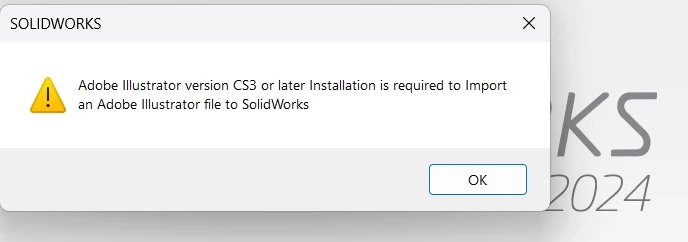
So then i save the file as a CS3 file and still this message come up. Should i save the file as a CS4 or later version?


thanks 

3 replies

Community Expert
May 4, 2025

Our shop used to have a Roland VersaCAMM printer and we used VersaWorks as the RIP to send files to that printer. However, I don't recall it ever being able to use Adobe Illustrator AI files. The RIP application could use a variety of other files, but when it came to vector formats it was either a choice of EPS or PDF. 

Brad @ Roaring Mouse
Community Expert
Community Expert
May 4, 2025

Yeah, I think the OP is a bit confused about what app they're working with.

Community Expert
May 5, 2025

The SolidWorks screenshot is a bit odd. And then VersaWorks is an industry-specific application; most people wouldn't know about that application unless they did large format printing work.


I'm also confused by the message in that error box. What difference would it make if there is a copy of Adobe Illustrator CS3 or later installed or not? Doesn't SolidWorks have its own built-in filters to import artwork? I don't understand why it might depend on Illustrator to do the work unless there is some weird OLE linking operation taking place.

Brad @ Roaring Mouse
Community Expert
Community Expert
May 3, 2025

Your screen grab appears to be for Solidworks 2024... Versaworx is a RIP for Roland devices... an entirely different thing. In any case, this would be a question for Solidwork about their ability to use Illustrator files.

Monika Gause
Community Expert
Community Expert
May 3, 2025

I would check out other file formats, such as DWG/DXF, PDF or EPS