Participant
June 5, 2017
Answered

How is this blue box showing as a filter above the object that is above it in the layer?

  • June 5, 2017
  • 1 reply
  • 540 views

Hi,

I am amending an artwork we had made for our company. I want to change the background image and keep the blue filter above it, however whenever I make the clipping mask with the new background image the blue box sits behind and has no effect.

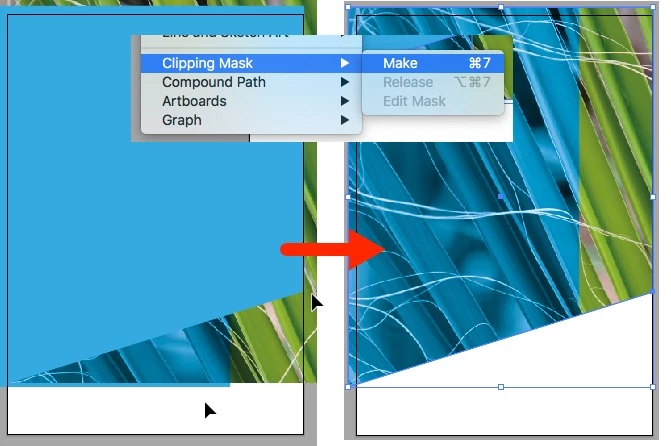
Is there a way to keep the existing effect shown in the image below? As you can see, the blue box path is below the clipping group but it still has an effect on the clipping group above it.


    This topic has been closed for replies.
    Correct answer intelligent_neighborsFA21

    Hello,

    First of all, when you place an image, you have to link it.

    2) Stack image, coloured frame and frame for the future clipping mask on the same layer.

    3) select coloured frame and change the blending mode to colour in the appearance palet (nearby the opacity options)

    4) Then select all the frames mentioned before and menu > Object > Clipping mask > Make (see image below)

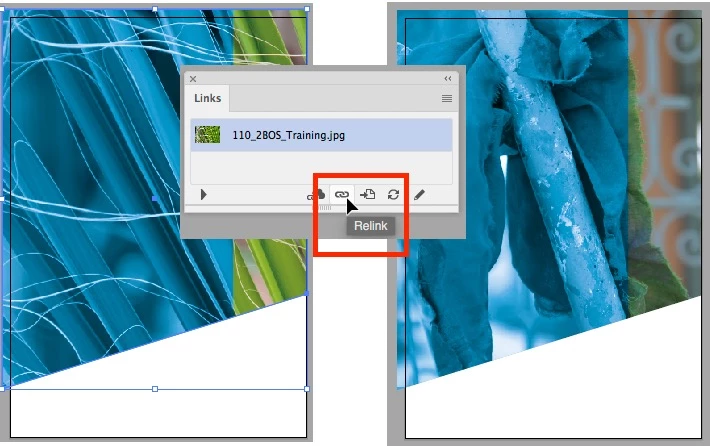
    5) If you want to change the image, it's quiet easy because the image is linked, so you only have to change the link to the other image.

    6) You can find the image in the Links palet. At the bottom of the links palet you will be able to relink the image.

    7) If doing so all the color blends and transparency will be remained and easy to reuse.

    Good luck.

    Patrick

    1 reply

    Monika Gause
    Community Expert
    Community Expert
    June 5, 2017

    Please describe step by step how that was made and what you are doing.

    Participant
    June 5, 2017

    I want to change the image of the grass in the selected clipping group in the above image to another image. I want to retain the blue filter being provided by the blue box that is selected in the above image.

    When I release the clipping mask, change the grass image and remake the clipping group the blue box sits below the clipping group and does not provide the filter effect shown in the above image. Everything is the same except for the image as far as I can tell but the blue box is not providing a filter now?

    Monika Gause
    Community Expert
    Community Expert
    June 5, 2017

    You need to keep the same stacking order.

    I still don't understand what you're doing there. If you keep the stacking order, everything should be the same. Unless the toning is made by other means.