
Tyler Harney
Participating Frequently
October 3, 2019
Question

(How) Reference one line of an ENTIRE shape to be vertical?

  • October 3, 2019
  • 5 replies
  • 945 views

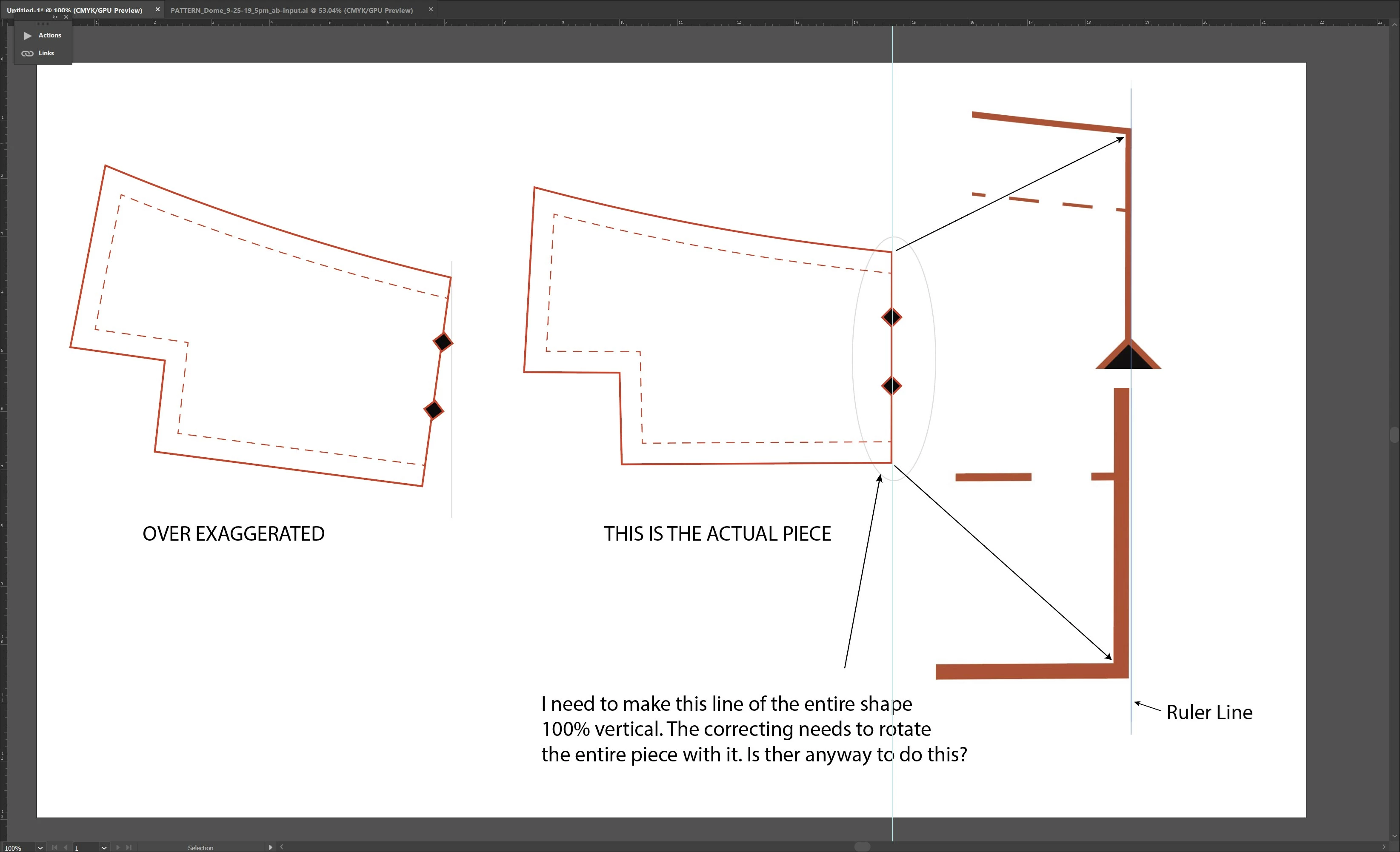
Hey all, I have some shapes that have been drawn/traced off rotation by just a 1/2 a degree or something. The shapes I'm working on need to have one of the edges referenced perfectly vertical. I attached a screenshot of what I'm alking about. 

Some solutions that I've read don't work, because It doesn't rotate the *entire* shape with the line that I'd like to make vertical. In the CAD world where I come from, we have constraints where we select the edge of the sketch we would like to be vertical and it rotates the sketch accordingly.


Does this make sense?


This topic has been closed for replies.

5 replies

Kurt Gold
Community Expert
Community Expert
October 4, 2019

Misunderstood the request.

Jacob Bugge
Community Expert
Community Expert
October 3, 2019

You are welcome, Tyler.


Monika Gause
Community Expert
Community Expert
October 3, 2019

Use the rotate tool and turn on Smart Guides and then like this: https://www.dropbox.com/s/tyfy7801g3yiv4w/vertical.mov?dl=0


Jacob Bugge
Community Expert
Community Expert
October 3, 2019

Tyler,


The Line Segment Tool and Smart Guides are your friends.


0) If not already, select everything to be rotated and Ctrl/Cld+G to Group;

1) ShiftClickDrag vertically upwards from the lower end Anchor Point of the path segment to be vertical past the upper end of the segment;

2) Select the Rotate Tool, and Click the lower coinciding end Anchor Point of the line and the path segment to set it as the centre;

3) Zoom in on the top end, then ClickDrag the top end Anchor Point of the path segment to snap to the vertical line, and you are there (Smart Guides say path when you are within snapping distance).


Edit: This works without your needing to know the angle.

Tyler Harney
Participating Frequently
October 3, 2019
Got it! Thank you so much. So simple and easy
Participating Frequently
October 3, 2019

If you know the rotation degree, you can select the rotation tool. In your example hold the alt key to move the rotation point to the upper right corner point (set snap to point in View). Release and then enter the rotation degree.

Tyler Harney
Participating Frequently
October 3, 2019
How do I find out what degree the line is currently sitting at?