



vinny38
Legend
Feb 2, 2018 2:06 PM UTC
Answered

How to access the Tilde key with a French Keyboard?

In Illustrator, "Tilde" key ~ seems to have some magical power:

According to Adobe's site, it can "transform pattern (independent of object) when using Selection tool, Scale tool, Reflect tool, or Shear tool". 

Sounds great! I wish I could play around with it, but... I use a French keyboard. No such key on my keyboard.
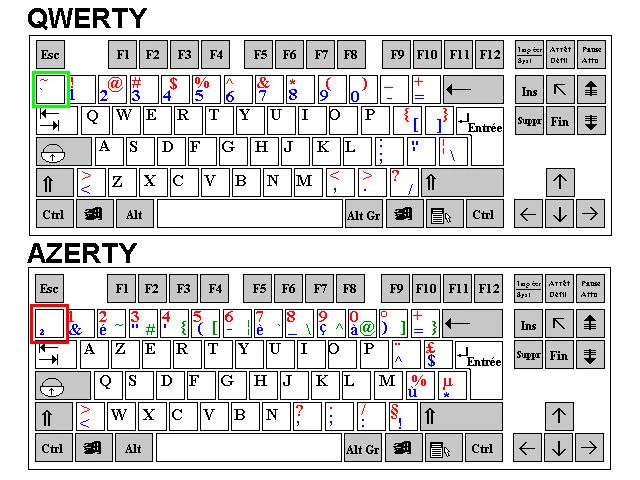
² key is not working. And to access the tilde character, I must combine alt + é/2 keys, which obviously results to a duplication of the selected object.

I know I could change my keyboard through the Windows regional settings, but maybe there's another way.

Maybe this key is hidden somewhere, or maybe I could change it through the keyboard shortcuts menu. 

Any help appreciated.

Specs: CS6 - Windows 7

This topic is closed to new replies. Start a new post to keep the conversation going.
jonasdr
jonasdrCorrect answer
Inspiring
Jul 9, 2024 8:16 PM UTC

I've been looking for a solution myself for this after seeing a demo about the magic behind the tilde key in Illustrator. As I do not have the ² key, I've been tapping around my keyboard and accidentally found that the key left of the W (the one with an arow pointing left and on top there's one pointing to the right) does the same trick 🙂

43 replies

Participant
Nov 15, 2018 1:49 AM UTC

So I have a french-Canadian QWERTY keyboard, live in Quebec.. I am able to move patterns within and object with both selection and direct selection tool and alt+the u accent to the left of the z, when I  press shift and that same letter I get the Tilde ~......Hope this helps

Translate
vinny38
vinny38Author
Legend
Nov 15, 2018 10:56 AM UTC

Thanks for your suggestion, unfortunately not working with an AZERTY keyboard...

Translate
Monika Gause
Community Expert
Community Expert
Nov 15, 2018 11:06 AM UTC

Please post this on http://illustrator.uservoice.com

There the engineers will read it. And they are the only ones who can fix it.

Translate
Legend
Feb 2, 2018 3:21 PM UTC

Surely not Alt+é but AltGr+é.

Translate
vinny38
vinny38Author
Legend
Feb 2, 2018 3:25 PM UTC

Right, not Alt but AltGr, my mistake.

However both Alt and AltGr duplicate the object.

Translate
Monika Gause
Community Expert
Community Expert
Feb 2, 2018 2:18 PM UTC

It's not always the tilde key. On German keyboards it's the < resp the Ö

So you might want to just search around your keyboard.

Translate
vinny38
vinny38Author
Legend
Feb 2, 2018 3:06 PM UTC

Hey Monika

As a matter of fact, I did try every key, with no luck...

Translate
Jacob Bugge
Community Expert
Community Expert
Feb 2, 2018 8:23 PM UTC

Vinny,

Maybe too silly, but will you try once again the £ (Caps), just to the left of the Entrée key on the AZERTY keyboard?

That is the character on a French Mac keyboard with the same function as the ~ Tilde.

Translate