


Participant
January 6, 2020
Question

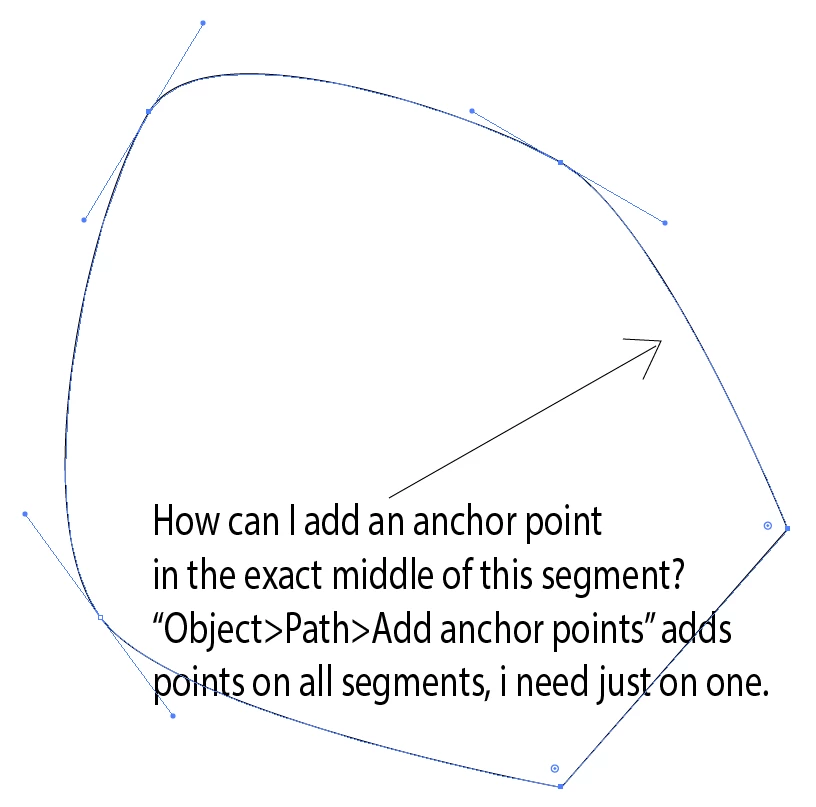
How to add an anchor point in exact middle between two other anchor points on a path?

  • January 6, 2020
  • 6 replies
  • 17226 views

If I use "Object>Path>Add anchor points" it will add anchors in every segment of the path I just need one anchor on one segment. I cannot add multiple points and delete the unwanted ones because it will deform the path in other areas.

This picture is just an example, not my actual work. I just switched to Illustrator from Inkscape, there is a dedicated button for this purpose in Inkscape, there must be something similar in Illustrator.

Thanks in advance for your help.
6 replies

Jacob Bugge
Community Expert
Community Expert
March 31, 2025

Jesse, and Magnus if you ever see this thread of yours again,


I should prefer to just use the very simple Divide Length script in this free set of scripts by 佐藤浩之 (Satō Hiroyuki),

https://shanfan.github.io/Illustrator-Scripts-Archive/


Just deselect the path (you can click an empty spot on the Artboard/work area), then Click the desired path segment with the Direct Selection Tool, then apply the script with the default 2 (you can divide it into any number).


This is fully accurate regardless of the segment shape.


Edit: Having to scroll through to the bottom right now made me realize that I had completely failed to see that the answer in post #3 from Ray (Craighead) was based on exactly the same; being too hasty I had thought it was a new  script to copy as text and insert.


Participant
March 31, 2025

Found an easy solution by using the pen tool to add the point anywhere between the other two points, then select all three points and just use the "distribution" button to get it in the middle. Worked better on a square or straight line so I could use the vertical distribution or horizontal distribution buttons.

MagnussAuthor
Participant
January 7, 2020

Thanks very much for all replies, I think the script is the most convenient solution.

rcraighead
Legend
January 6, 2020

"Divide (length).jsx" script will do this. It can be found here: https://shanfan.github.io/Illustrator-Scripts-Archive/
It works in AI CC 2015 (Mac).

Enter "2" in the dialog.

It could be edited to perform the simple task without dialogs.


Edit:
To disable dialog and always place one new anchor per line segment disable line highlighted in blue:

Ton Frederiks
Community Expert
Community Expert
January 6, 2020

Like Omar said, cut the path.

Probably faster by selecting the segment with the Direct Selection Tool and choose Cut followed by Paste in front/place.

Object > Path Add Anchor Points

Select both paths and Join

Omar.Fathy
Community Expert
Community Expert
January 6, 2020

You can use the Scissor Tool to cut the sigment line/curve that you need to add point to it by just click on the 2 points with the Scissor tool. Use the Add Anchor Point Command. Use the Join tool or command to join it again 😄