Participant
July 13, 2017
Answered

How to add color to Texture ?

  • July 13, 2017
  • 3 replies
  • 3020 views

this may be a easy solution.

Still quite new to this but, having trouble adding color the a effect texture. No matter what i do, color does not show. Please Help me !


This topic has been closed for replies.
Correct answer Bill Silbert

As Larry says without knowing how you created the pattern it is hard to tell you a specific way to color it. However, one technique that I can offer can be used regardless of how the pattern was created using blending modes. To do so create a duplicate of the shape that the pattern is in and fill it with color. Then select it and use one of the blending modes in the Transparency Panel. See screen shot below for two examples:
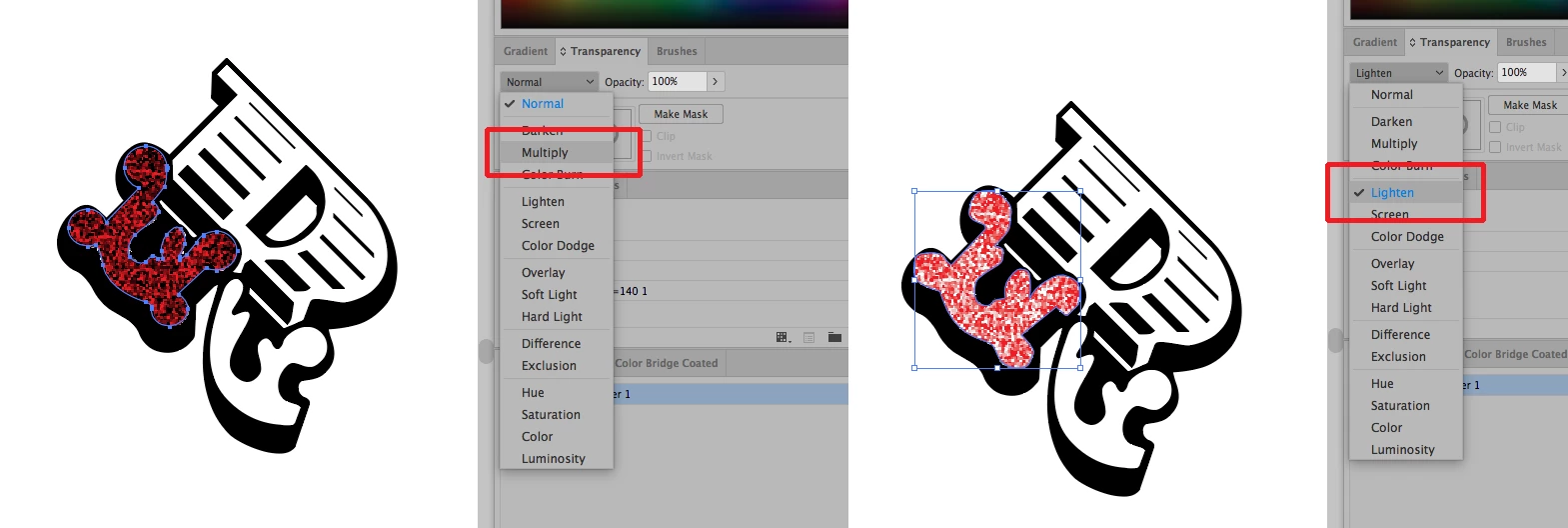
If your pattern is actually an Illustrator pattern tile then you can select the shape and choose Expand under the Object Menu to turn it into editable Illustrator art.

3 replies

Ray Yorkshire
Participating Frequently
July 13, 2017

Make sure illustrator has not got confused and switched to Grayscale

Change to a colour mode if so

Bill Silbert
Community Expert
Bill SilbertCommunity ExpertCorrect answer
Community Expert
July 13, 2017

As Larry says without knowing how you created the pattern it is hard to tell you a specific way to color it. However, one technique that I can offer can be used regardless of how the pattern was created using blending modes. To do so create a duplicate of the shape that the pattern is in and fill it with color. Then select it and use one of the blending modes in the Transparency Panel. See screen shot below for two examples:

If your pattern is actually an Illustrator pattern tile then you can select the shape and choose Expand under the Object Menu to turn it into editable Illustrator art.

saaucyvalAuthor
Participant
July 13, 2017

michelew83603738
Community Expert
Community Expert
July 13, 2017

Some of the effects that you are using render the image black and white, such as torn edges. So as Bill suggests, the best way to get color, copy the shape and apply a blend mode and opacity setting to get the desired result. Which effects will render black and white can be found: Summary of effects in Illustrator

Larry G. Schneider
Community Expert
Community Expert
July 13, 2017

How was the texture created/applied? Can you show us a screenshot with the object selected and the Appearance panel shown?

saaucyvalAuthor
Participant
July 13, 2017

i have 3 effects going.