Hi again Qwertyfly...
First of all I'd like to thank you for your interest and support.
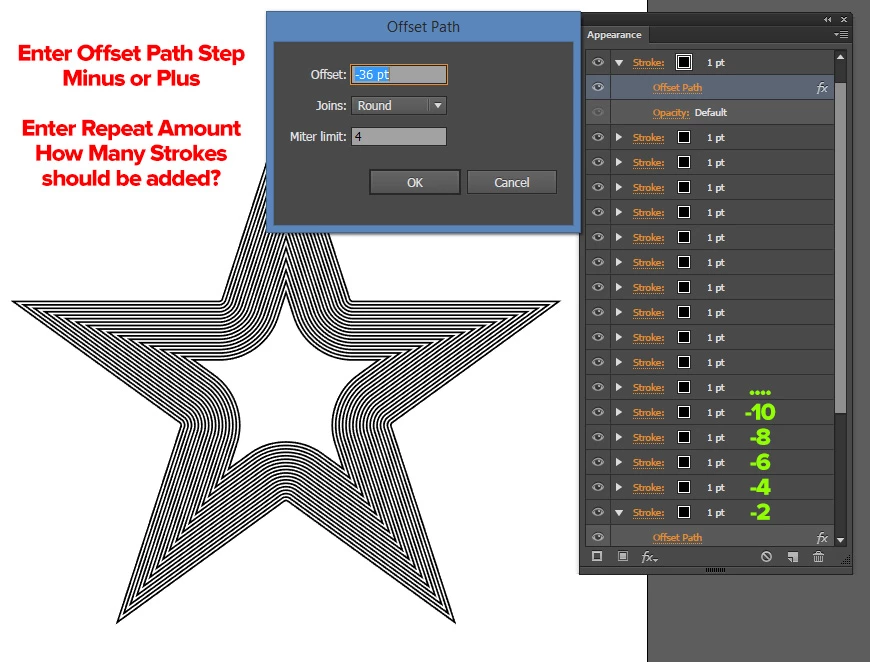
It's working but it open up a dialogue box, what I was trying to do is actually creating a loop with user specific values which creates say 10 px offset paths with new strokes. Like 2,4,6,8,10... offset values.
Also as you said it creates new action set each time. I tried unload action command.
Now I tried to mix this code with CarlosCanto 's code. But as a newbie coder I could not find again  It becomes an obsession to me.
I also tried adding xmlstring way in order to add user options.
xmlstring = '<LiveEffect name="Live Offset Path"><Dict data="R mlim '+miterlimitvalue + ' R ofst ' + offsetvalue + ' I jntp ' + jointype + '"/></LiveEffect>';
But this way it applies offset path outside of stroke which is not what I want.
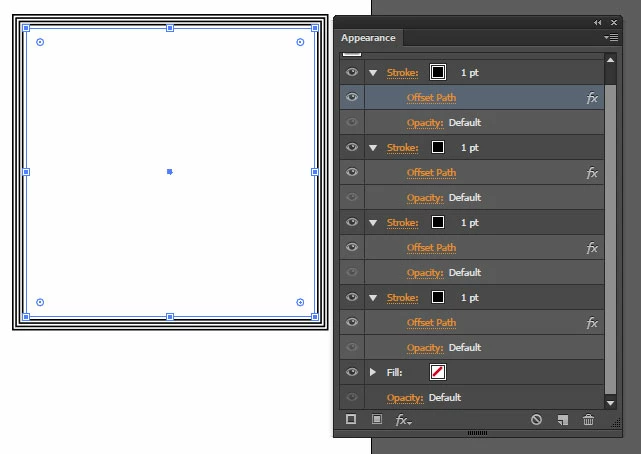
What I really want is exactly in screenshot;
var idoc = app.activeDocument;
var ipath = idoc.selection[0];
var offsetvalue = '8';
var jointype ='Round';
var miterlimitvalue = '4';
var myAction = "OffsetPath";
var mySet = "OffsetPath";


xmlstring = '<LiveEffect name="Live Offset Path"><Dict data="R mlim '+miterlimitvalue + ' R ofst ' + offsetvalue + ' I jntp ' + jointype + '"/></LiveEffect>';


var actionStr = [
'/version 3',
'/name [ ' + mySet.length,
ascii2Hex(mySet),
']',
'/isOpen 1',
'/actionCount 1',
'/action-1 {',
'/name [ ' + myAction.length,
ascii2Hex(myAction),
']',
' /keyIndex 0',
' /colorIndex 0',
' /isOpen 1',
' /eventCount 2',
' /event-1 {',
' /useRulersIn1stQuadrant 0',
' /internalName (ai_plugin_appearance)',
' /localizedName [ 10',
' 417070656172616e6365',
' ]',
' /isOpen 0',
' /isOn 1',
' /hasDialog 0',
' /parameterCount 1',
' /parameter-1 {',
' /key 1835363957',
' /showInPalette -1',
' /type (enumerated)',
' /name [ 14',
' 416464204e6577205374726f6b65',
' ]',
' /value 2',
' }',
' }',
' /event-2 {',
' /useRulersIn1stQuadrant 0',
' /internalName (adobe_commandManager)',
' /localizedName [ 16',
' 416363657373204d656e75204974656d',
' ]',
' }',
'}'
].join('\n');

 try {
       app.doScript (myAction, mySet); // missing action doesn't trigger an error, but it brings up Illustrator warning about action not being available - Click on "Stop" to continue
       app.unloadAction (mySet, myAction); // unloads action but it keeps the set folder, loading actions keep duplicating folder actions
    }
    catch (e) {
        var f = new File('~/ScriptAction.aia');
        f.write(actionStr);

        app.loadAction (f);
        app.doScript (myAction, mySet);
        ipath.applyEffect(xmlstring);
        f.close();
        f.remove();

    }


function  ascii2Hex (hex) {
    return hex.replace(/./g, function (a) {return a.charCodeAt(0).toString(16)})
}
OK, I'm going to assume your on windows going by the screen shot in the opening post.
here is a completely different approach.
this uses executeMenuCommand so is only compatible with CS6+
and is Windows only as it uses VB
//-------------------------------------------------------------------


// Offset Path in apperence panel


// Script by Qwertyfly
// contact tristan@qwertyfly.com
// version 0.1 beta


//-------------------------------------------------------------------


//number of offset paths
var Qty = 5;


//amount to offset
var Offset = -5;


//units to offest in
var Unit = "px";


//time to wait in milliseconds before sending keys.
// more time is slower but more stable
// I was able to run this with it set to 0, but a little bit of a pause is a good idea.
var wait = 10;


//-------------------------------------------------------------------
function FillDialog_Windows(distance){
    var VB = [
        'WScript.Sleep ' + wait + '',
        'Set WshShell = WScript.CreateObject("WScript.Shell")',
        'WshShell.SendKeys "' + distance + '"',
        'WshShell.SendKeys "{ENTER}"'
        ].join('\n');
    var VBgo = new File('~/go.vbs');
    VBgo.open('w');
    VBgo.write(VB);
    VBgo.close();
    VBgo.execute();
}
function MakeStroke(offset){
    app.executeMenuCommand('Adobe New Stroke Shortcut');
    FillDialog_Windows(offset);
    app.executeMenuCommand('Live Offset Path');
}


for(var i = 1; i<Qty+1; i++){
    MakeStroke(i*Offset + Unit);
}



 AdChoices