
Known Participant
January 7, 2019
Answered

How To Angle the Base of a Rectangle?

  • January 7, 2019
  • 3 replies
  • 932 views

Hello Everyone! I'm working on designing a drill in Illustrator following a tutorial and I'm a little confused. It says to, "Select the lower portion of the handle with the Direct Selection Tool and move the base to the right to shift the handle." And it seems to be angling and shifting the whole object. (See image below)
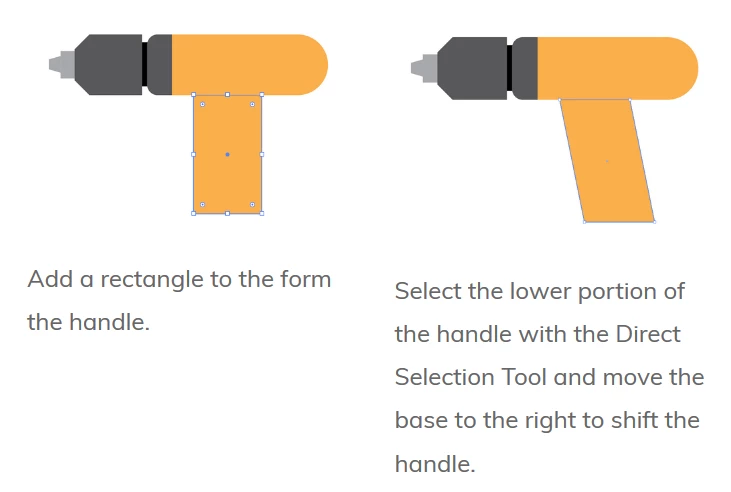
But when I do it, it looks like this: (It's not shifting/angling the entire object)

Can someone help me figure out what I'm doing wrong?

Thank you!!

This topic has been closed for replies.
Correct answer rcraighead

Emily,

As long as both anchor points are "corner" points the line segment can be dragged, using the Direct Selection tool to move the segment AND the anchor points on either end.

If either anchor point is a "smooth" point, dragging the line segment will move the "Direction Points" that define the Line Segment.

It is helpful to understand the "anatomy" of a line segment in Illustrator and reference them by name.

3 replies

Kevin Stohlmeyer
Community Expert
Community Expert
January 7, 2019

When selecting your points with the direct select tool, hold the shift key down in order to select two points at the same time.

rcraighead
Legend
January 7, 2019

That would work.

It sounds like the tutorial is trying to teach the concept of direct selecting  the "line segment" not the points.

To select both points I'd recommend dragging to select them both in one step using the Direct Select tool.

Known Participant
January 7, 2019

Thank you so much! This was so helpful and it worked! Appreciate the help everyone I was originally pulling from the anchor points, not from the middle!

Jacob Bugge
Community Expert
Community Expert
January 7, 2019

Emily,

Or Click (and then Drag) (somewhere on) the bottom path segment.

rcraighead
rcraigheadCorrect answer
Legend
January 7, 2019

Emily,

As long as both anchor points are "corner" points the line segment can be dragged, using the Direct Selection tool to move the segment AND the anchor points on either end.

If either anchor point is a "smooth" point, dragging the line segment will move the "Direction Points" that define the Line Segment.

It is helpful to understand the "anatomy" of a line segment in Illustrator and reference them by name.

Legend
January 7, 2019

Make sure that you are selecting both of the bottom points of the rectangle.