



dublove
Legend
May 20, 2026
Question

How to apply coloring and strokes to different texts multiple times by sucking on the style only once?

  • May 20, 2026
  • 2 replies
  • 64 views

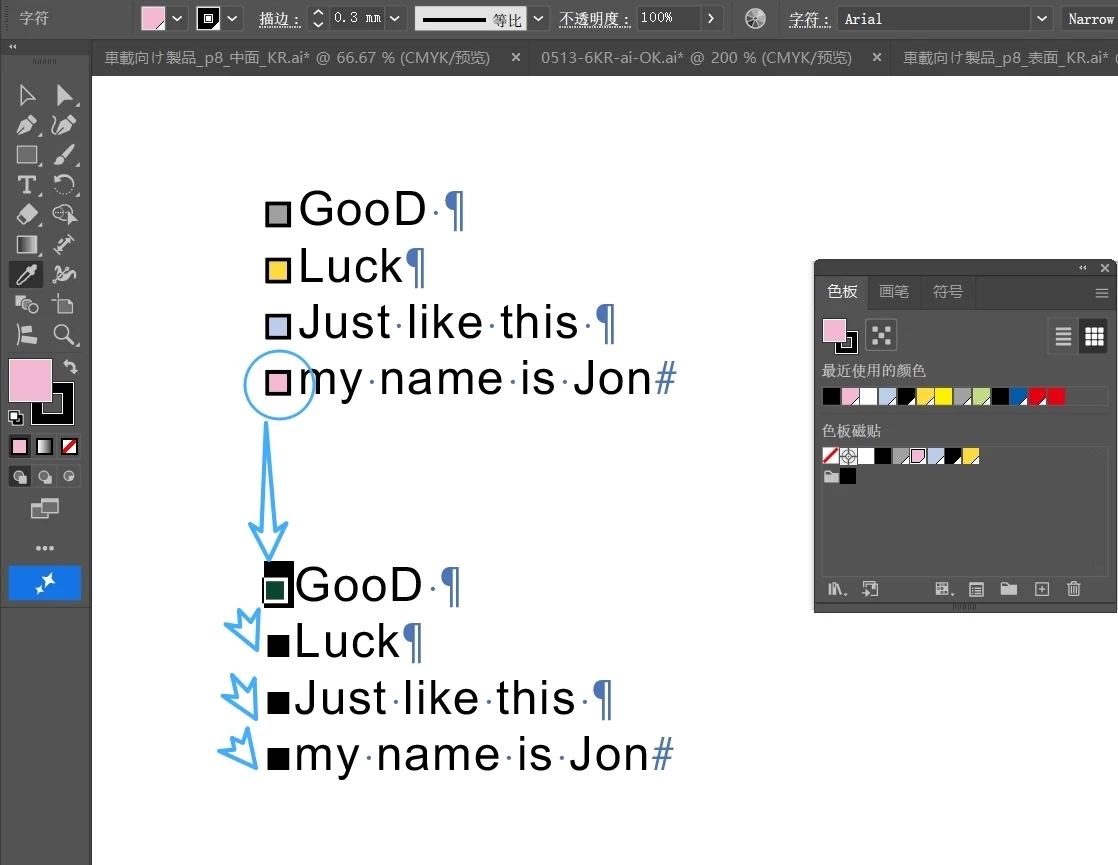
As shown in the figure below, all black boxes in the second text box need to be changed to the "true color+stroke" style in front of the first text box.
Is it possible to only suck on the style once (with strokes and coloring) and apply it multiple times?
I need one at a time now, it's so slow.

I feel that if you don't jump out of the text box, you won't be able to select new text content again
 

    2 replies

    Community Expert
    May 28, 2026

    I removed my reply didn’t realise it was Illustrator forum.

    Monika Gause
    Community Expert
    Community Expert
    May 27, 2026

    Sorry for the crappy audio, this is how you can do it: 


    dublove
    dubloveAuthor
    Legend
    May 29, 2026

    Unable to see video

    Harshika Verma
    Community Manager
    Community Manager
    June 3, 2026

    Hi ​@dublove,

    Hope you’re doing well!

    Are you still unable to see the video shared by our community expert? Were you able to follow the workflow? Please let us know.

    We will be happy to assist you further.


    Thanks,

    Harshika