Inspiring
January 2, 2021
Answered

How to automatically place a label on visual center of nested shapes?

  • January 2, 2021
  • 1 reply
  • 534 views

Hi, I’ve written a JavaScript for Adobe Illustrator to automatically add text labels to shapes. The problem is that the shapes have sometimes odd forms (like U f.e.) it’s therefore hard to find the visual center of the shapes lying inside the shape to place the text label. I found the following algorithm: A new algorithm for finding a visual center of a polygon | by Mapbox | maps for developers which does the job to some extend (N.B.: some “porting” of the code has been required to use it in Illustrator, see  Solved: Re: ‘require’ keyword to import modules in Illustr... - Adobe Support Community - 11708866 )  

The result of using this algo is still not satisfying especially in case of “nested” shapes like for example:
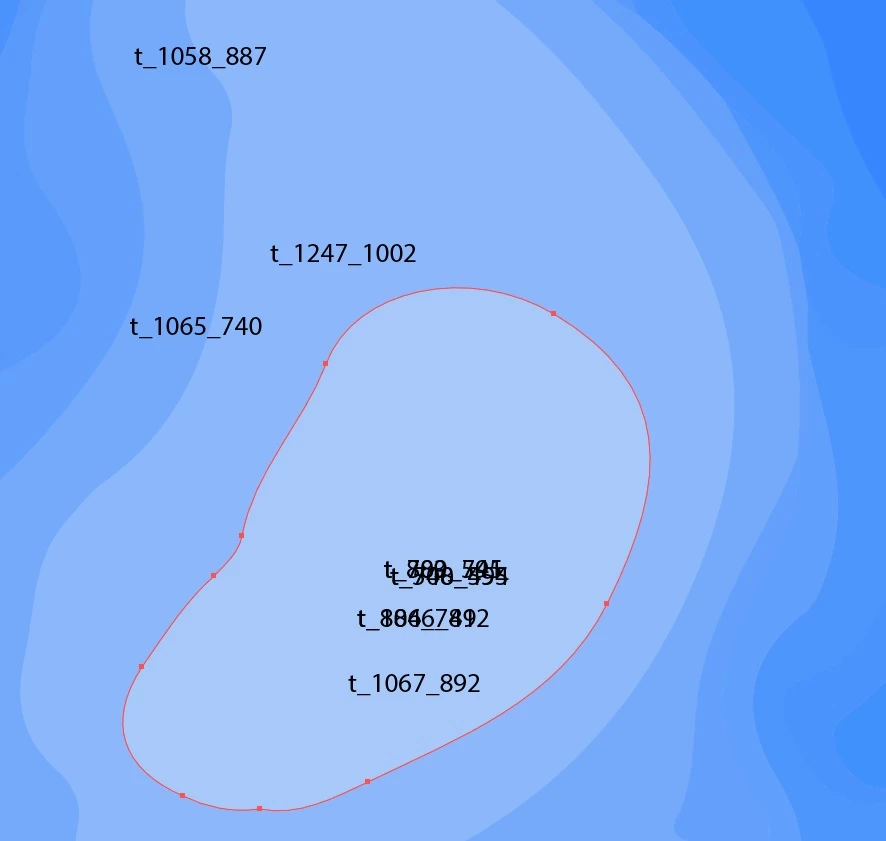
This is NOT because the mentioned algo is not good enough but rather because my script does a ‘for loop’ over each shape but there is currently no detection mechanism to check if there is another (the outermost) shape lying inside the current shape. Such a inner shape would determine the ‘hole’ inside the current shape which shall be added to the overall coordinated of the current shapes (in GeoJSON-like format ) to get better results with the mentioned algorithm. I wonder if somebody has overcome this problem? I would be grateful if you could share the (JavaScript) code you've been using to solve this problem! 

This topic has been closed for replies.
Correct answer Leonie5FA9

Hi femkeblanco, thank you for your reply! I tried to automatically convert my (nested) paths to compound paths using the "Pathfinder Tool" but I couldn’t find a convenient method (some of the paths disappear when converting, which is expected behavior). And to answer your question: No, my existing script doesn’t work on compound paths (I didn’t really investigate why…). Anyway, your reply inspired me to adapt my existing script, unfortunately I encountered a new problem: “How to check if a shape is inside another curved shape?” I’ll post a new ticket. Thanks again, kind regards!

1 reply

femkeblanco
Legend
January 2, 2021

Will the algorithm work for a given polygon with a "hole" (a compound path in Illustrator)?  I suspect it won't.  But if it did, it's simply a matter of making each path a compound path with a copy of the path in front. 

Leonie5FA9AuthorCorrect answer
Inspiring
January 10, 2021

Hi femkeblanco, thank you for your reply! I tried to automatically convert my (nested) paths to compound paths using the "Pathfinder Tool" but I couldn’t find a convenient method (some of the paths disappear when converting, which is expected behavior). And to answer your question: No, my existing script doesn’t work on compound paths (I didn’t really investigate why…). Anyway, your reply inspired me to adapt my existing script, unfortunately I encountered a new problem: “How to check if a shape is inside another curved shape?” I’ll post a new ticket. Thanks again, kind regards!