
Inspiring
October 11, 2023
Answered

How to change the gradient length?

  • October 11, 2023
  • 1 reply
  • 387 views

Hi all


A radial gradient of two colors, black and white, is applied to the object as a fill color.
By default, the length of the gradient is from the starting point in the middle of the bounding box to the ending point at the edge of the bounding box. How can I change this length using script commands?
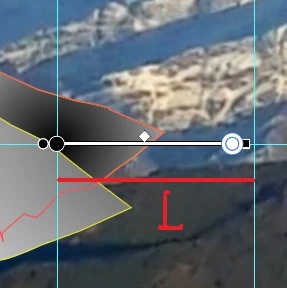
 

when you change this length manually, and then using the command
var L = item.fillColor.length
you get this value (72.236), then the expected result is displayed.


But the commander is like item.fillColor.length = 152 does not change this length???

This topic has been closed for replies.
Correct answer femkeblanco

It's a bug. A gradient's origin, length and angle cannot be overwritten.


Here's an elaborate workaround courtesy of CarlosCanto. This doubles a gradient's length (of a selected item) in the right direction:

var fillcolor = app.selection[0].fillColor;
app.selection[0].filled = false;
app.selection[0].fillColor = fillcolor;
app.selection[0].fillOverprint = app.selection[0].fillOverprint;
var f = app.getScaleMatrix(200, 100);  // double x
app.selection[0].transform(
    f, false, false, true, false, 0, Transformation.LEFT);


1 reply

femkeblanco
femkeblancoCorrect answer
Legend
October 11, 2023

It's a bug. A gradient's origin, length and angle cannot be overwritten.


Here's an elaborate workaround courtesy of CarlosCanto. This doubles a gradient's length (of a selected item) in the right direction:

var fillcolor = app.selection[0].fillColor;
app.selection[0].filled = false;
app.selection[0].fillColor = fillcolor;
app.selection[0].fillOverprint = app.selection[0].fillOverprint;
var f = app.getScaleMatrix(200, 100);  // double x
app.selection[0].transform(
    f, false, false, true, false, 0, Transformation.LEFT);