danielzzzzz
Participant
June 9, 2018
Answered

How to change to a higher resolution a PNG file

  • June 9, 2018
  • 3 replies
  • 37614 views

Hello,

I have some high quality vector design files (.eps) and am now exporting it to PNG with this tutorial:

How to create PNG files of your logo in Illustrator - 99designs

However my PNG files have all too low resolution, how can I change or increase the pixels? Is this even possible?

I am using Adobe Illustrator.

i appreciate any help! Thanks!

This topic has been closed for replies.
Correct answer manal shanableh

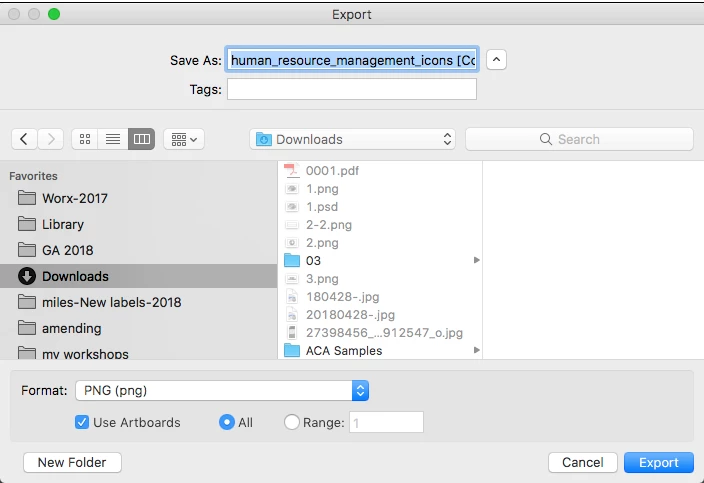
Change the resolution when you export as PNG

choose Format: PNG

Use Artboards if you need.

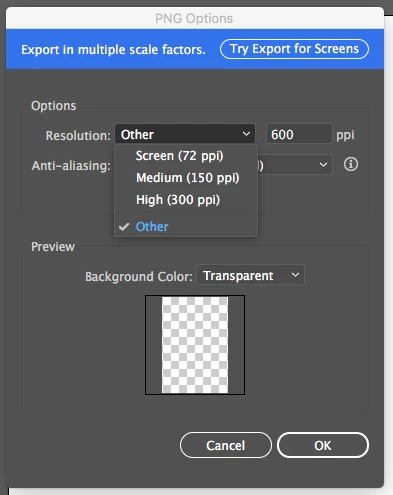
then change the PNG options.

3 replies

Ray Yorkshire
Participating Frequently
June 11, 2018

You have low quality .pngs already?

Then not really, or not greatly, if the detail isn't  there, upscale just adds artefacts as, whatever software you use has to makes guesses .

Better finding a more suitable .png

But some people swear bythe program 'On1 Resize'

or if you have, Photoshop try upscaller Preserve Details 2.0

Image> Image size > Resample

manal shanableh
manal shanablehCorrect answer
Legend
June 11, 2018

Change the resolution when you export as PNG

choose Format: PNG

Use Artboards if you need.

then change the PNG options.

Mohammad.Harb
Community Expert
Community Expert
June 11, 2018

File -> Export -> Export As..

then select Png , when you click save

anothor winodw will show to select the resolution