
Participant
June 25, 2024
Question

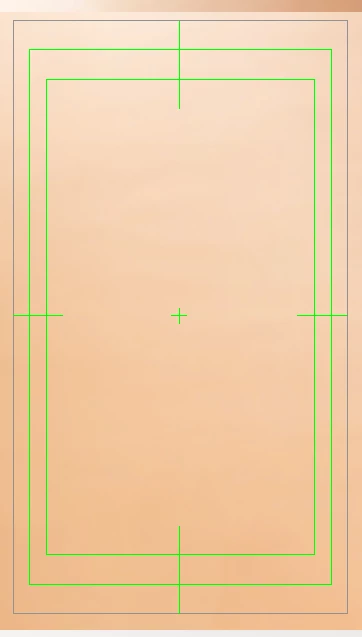
How to close those green lines?

  • June 25, 2024
  • 1 reply
  • 432 views

I create illustrator file with video mode, so it show those green lines in work area.

How to turn off those green line? I've tried lots of ways, but I can't do it.

And how I show only inside work area? I tried the view way I used before, but it doesn't work in video mode.
Please help me, thank you.
This topic has been closed for replies.

1 reply

Ton Frederiks
Community Expert
Community Expert
June 25, 2024

You can turn them off in the Artboard settings for Artboard 1

Participant
June 26, 2024

Thank you ! 😄
Then, do you know how to show only inside work area in video mode?

Community Expert
June 26, 2024

What video preset are you using? In my opinion, the green lines are a hold-over from the old, analog, standard definition standards where overscan (or cropping of the image) was definitely an issue. It was a common problem with cathode ray picture tube television sets. In modern HDTV standards there is little if any cropping taking place at all. A modern flat screen TV set is typically going to display a full 1920x1080 or 3840x2160 resolution image.


On the other hand, the green guide lines can be useful as a compositional aid. Unless you're running a graphics crawl or ticker across the bottom of the screen or something else that uses the edge of the image it's usually a good idea to leave a decent amount of "white space" or breathing room between graphics elements and the edge of the image. The green guidelines can help keep a motion graphics composition from looking cramped or crowded on screen.