Playmaxx
Participant
June 10, 2026
Question

How to combine multiple shape paths into one

  • June 10, 2026
  • 4 replies
  • 31 views
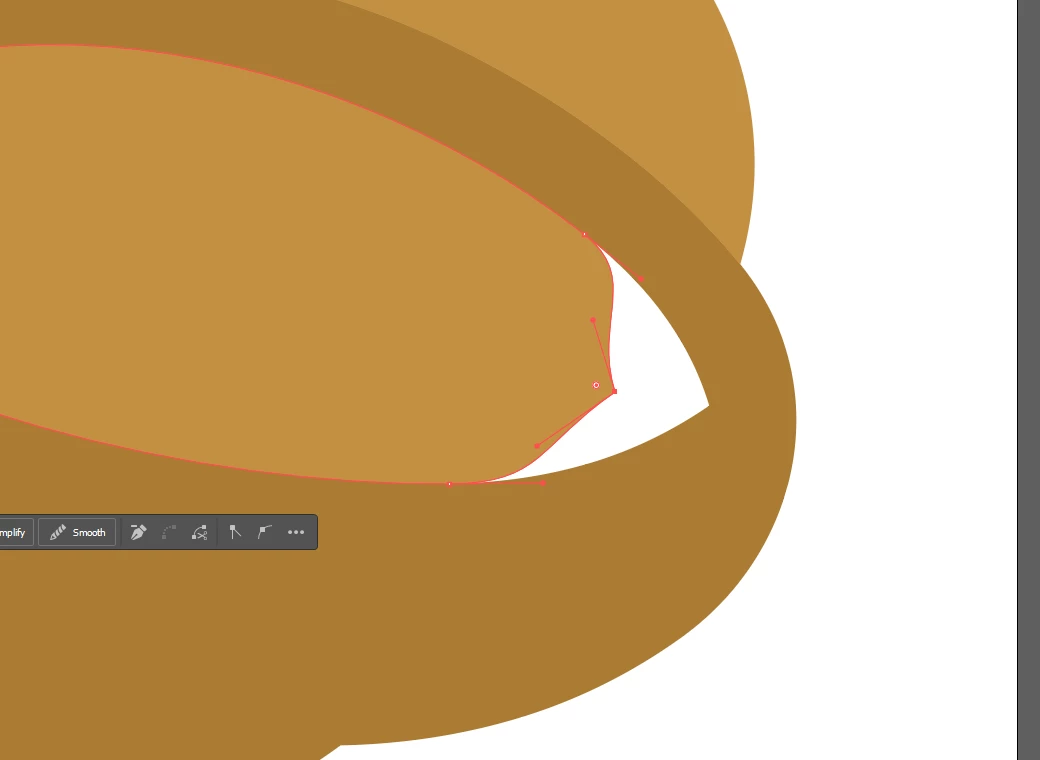
Two Shapes that have the same anchor points
One one anchor point moves, the other one stays at the same place

Why can’t i tell my shapes to use the same paths/anchors. i don’t want to edit multiple anchor points ALL the time, i want to be able to grab a single anchor point and all the shapes that use that anchor will move with it. Why is that not possible? how can such a simple feature that every 3D modeling program has, not be implemented into Illustrator????

    4 replies

    Ton Frederiks
    Community Expert
    Community Expert
    June 10, 2026

    You can move an rotate them when you select both points with the Lasso Tool.

    If you transform a single point, you can transform another one by choosing Transform Again (Cmd or Ctrl +D).

    Ton Frederiks
    Community Expert
    Community Expert
    June 10, 2026

    You can move an rotate them when you select both points with the Lasso Tool.

    If you transform a single point, you can transform another one by choosing Transform Again (Cmd or Ctrl +D).

    Ton Frederiks
    Community Expert
    Community Expert
    June 10, 2026

    @Playmaxx You can use the Lasso tool to select both points

    Playmaxx
    PlaymaxxAuthor
    Participant
    June 10, 2026

    this works if i only MOVE them, but as soon as i want to change any angles it will not work anymore...

    Tina_Irvine
    Community Expert
    Community Expert
    June 10, 2026

    Hi ​@Playmaxx,

    If you lock the outer shape, then use the white direct selection tool to select an area by dragging it over (click and drag to make a selection box/area) all of the anchor points you’d like, it will select them all at once, and then you can move them simultaneously.

    Playmaxx
    PlaymaxxAuthor
    Participant
    June 10, 2026

    doesnt work when i want to change any angles.