
Participating Frequently
January 5, 2017
Question

How to convert all layers into Group

  • January 5, 2017
  • 2 replies
  • 2293 views

Hi all,

I have a file with multiple layers containing multiple items.

i want each layers inside items convert into group but remain in layer how can i do this with scripts. i have used LayerToGroup.jsx script but with this just 1 top layer convert other remain the same. I need to convert every single layer into group
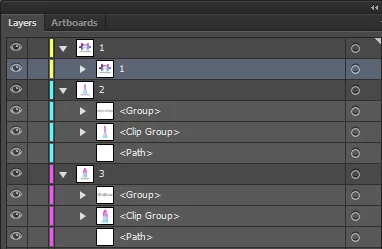
Any help would be very, very appreciated!

Thank you

This topic has been closed for replies.

2 replies

Participating Frequently
May 29, 2022

The above didn't work for me, so I hacked this together from a few different references. I'm SURE it needs variables etc to clean up, as I'm only a hack coder, but this works for me: 


if (app.documents.length > 0) {
  if (app.activeDocument.layers.length > 1) {
    for (var i = 0; i < app.activeDocument.layers.length; i++) //loop through all TOP LEVEL layers
    {
		app.activeDocument.layers[i].hasSelectedArtwork = true; //selects all in active layer
		app.executeMenuCommand('group'); //groups all selected
		app.activeDocument.selection = null; //deselect
    }
  } else {
    alert("The active document only has only 1 layer");
  }
}
Participating Frequently
May 29, 2022

Here's an interesting catch with this script... if I run it from the File->Scripts menu item... all is well. If I make an Action that runs that same menu item... I get an error dialoge, then another saying the "deselect" line  throws the error. Can anyone explain this?

Larry G. Schneider
Community Expert
Community Expert
January 5, 2017

Try over in the Illustrator Scripting Forum. Check on the Overview tab.