Inspiring
March 5, 2021
Answered

How to convert line path into curve path in illustrator sdk in vc++.................................

  • March 5, 2021
  • 1 reply
  • 1060 views

How I will convert a line path which is created by AIShapeConstruction suite into the curve 

sAIShapeConstruction->NewLinePoint(lineFirstPoint, lineSecondPoint, &new_art);

I want to create a U shape by using the 5 points.currently I am just drawing all line's given points.

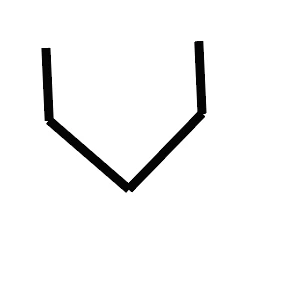
but it's shape showing like this


                Instead of this I have to draw this shape like U.

                Please assist me.


         Thanks

         Kundan


This topic has been closed for replies.
Correct answer superpanic

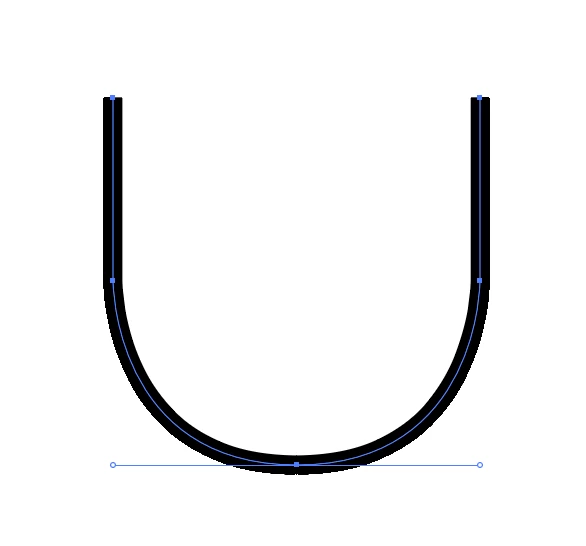
Hi Kundan! I'm not familiar with sAIShapeConstruction and maybe you need to use just that for some reason. If not, I would draw a U shape by first creating an AIArt object and drawing the 5 segments. Shaping the U curve by setting the path handles on the third segments. Here are some sample code that creates a simple U shape. Use the scale parameter for size. Please also see the image below showing of the resulting shape when  running this code. (Also mind that artview coordinates are not the same as segment coordinates, and might need to be converted.)


static ASErr PV_DrawUShape(const AIRealPoint &thePoint, const AIReal &theScale) {
	
	// the following suites should be loaded before calling this function
	if (!sAIArt) return -1;
	if (!sAIPath) return -1;

	ASErr error = kNoErr;
	AIArtHandle path;
	AIPathSegment segments[5];

	// Create new art, we will fill it with points below.
	error = sAIArt->NewArt(kPathArt, kPlaceAboveAll, NULL, &path);

	if (error) goto error;

	// the U shape has 5 points	
	error = sAIPath->SetPathSegmentCount(path, 5);

	// draw a U with it's curved butt centered at &thePoint:

	// # point 0
	// upper left point of the U (starting point)
	segments[0].p.h = thePoint.h - 1 * theScale;
	segments[0].p.v = thePoint.v + 2 * theScale;
	// straight line
	segments[0].in = segments[0].out = segments[0].p; 
	segments[0].corner = true;

	// # point 1
	// mid left point of the U
	segments[1].p.h = thePoint.h - 1 * theScale;
	segments[1].p.v = thePoint.v + 1 * theScale;
	// straight line
	segments[1].in = segments[1].out = segments[1].p;
	segments[1].corner = true;

	// # point 2
	// center bottom point of the U's butt
	segments[2].p.h = thePoint.h; // center position, should not scale
	segments[2].p.v = thePoint.v; // center position, should not scale
	// set handles for the curved line
	segments[2].in.h = thePoint.h - 1 * theScale;
	segments[2].in.v = thePoint.v;
	segments[2].out.h = thePoint.h + 1 * theScale;
	segments[2].out.v = thePoint.v;
	segments[2].corner = false; // not a corner!

	// # point 3
	// mid right point of the U
	segments[3].p.h = thePoint.h + 1 * theScale;
	segments[3].p.v = thePoint.v + 1 * theScale;
	// straight line
	segments[3].in = segments[3].out = segments[3].p;
	segments[3].corner = true;

	// # point 4
	// upper right point of the U (end point)
	segments[4].p.h = thePoint.h + 1 * theScale;
	segments[4].p.v = thePoint.v + 2 * theScale;
	// straight line
	segments[4].in = segments[4].out = segments[4].p;
	segments[4].corner = true;

	error = sAIPath->SetPathSegments(path, 0, 5, segments);

	if (error) goto error;

error:
	return error;

}
 

1 reply

superpanicCorrect answer
Inspiring
March 6, 2021

Hi Kundan! I'm not familiar with sAIShapeConstruction and maybe you need to use just that for some reason. If not, I would draw a U shape by first creating an AIArt object and drawing the 5 segments. Shaping the U curve by setting the path handles on the third segments. Here are some sample code that creates a simple U shape. Use the scale parameter for size. Please also see the image below showing of the resulting shape when  running this code. (Also mind that artview coordinates are not the same as segment coordinates, and might need to be converted.)


static ASErr PV_DrawUShape(const AIRealPoint &thePoint, const AIReal &theScale) {
	
	// the following suites should be loaded before calling this function
	if (!sAIArt) return -1;
	if (!sAIPath) return -1;

	ASErr error = kNoErr;
	AIArtHandle path;
	AIPathSegment segments[5];

	// Create new art, we will fill it with points below.
	error = sAIArt->NewArt(kPathArt, kPlaceAboveAll, NULL, &path);

	if (error) goto error;

	// the U shape has 5 points	
	error = sAIPath->SetPathSegmentCount(path, 5);

	// draw a U with it's curved butt centered at &thePoint:

	// # point 0
	// upper left point of the U (starting point)
	segments[0].p.h = thePoint.h - 1 * theScale;
	segments[0].p.v = thePoint.v + 2 * theScale;
	// straight line
	segments[0].in = segments[0].out = segments[0].p; 
	segments[0].corner = true;

	// # point 1
	// mid left point of the U
	segments[1].p.h = thePoint.h - 1 * theScale;
	segments[1].p.v = thePoint.v + 1 * theScale;
	// straight line
	segments[1].in = segments[1].out = segments[1].p;
	segments[1].corner = true;

	// # point 2
	// center bottom point of the U's butt
	segments[2].p.h = thePoint.h; // center position, should not scale
	segments[2].p.v = thePoint.v; // center position, should not scale
	// set handles for the curved line
	segments[2].in.h = thePoint.h - 1 * theScale;
	segments[2].in.v = thePoint.v;
	segments[2].out.h = thePoint.h + 1 * theScale;
	segments[2].out.v = thePoint.v;
	segments[2].corner = false; // not a corner!

	// # point 3
	// mid right point of the U
	segments[3].p.h = thePoint.h + 1 * theScale;
	segments[3].p.v = thePoint.v + 1 * theScale;
	// straight line
	segments[3].in = segments[3].out = segments[3].p;
	segments[3].corner = true;

	// # point 4
	// upper right point of the U (end point)
	segments[4].p.h = thePoint.h + 1 * theScale;
	segments[4].p.v = thePoint.v + 2 * theScale;
	// straight line
	segments[4].in = segments[4].out = segments[4].p;
	segments[4].corner = true;

	error = sAIPath->SetPathSegments(path, 0, 5, segments);

	if (error) goto error;

error:
	return error;

}


Inspiring
March 8, 2021

Thanks @superpanic  for  your quick response .

I am having the all 5 points for U shape but I was drawing it as a line using the shape construction suite .

I am trying the way as you suggested and I hope it will work for me also, then I will let you 

know .

Again thanks for your reply .


Regards

Kundan