


artur-amparo
Participant
Sep 5, 2018 3:33 PM UTC
Answered

How to convert path to shape or polygon and vice versa?

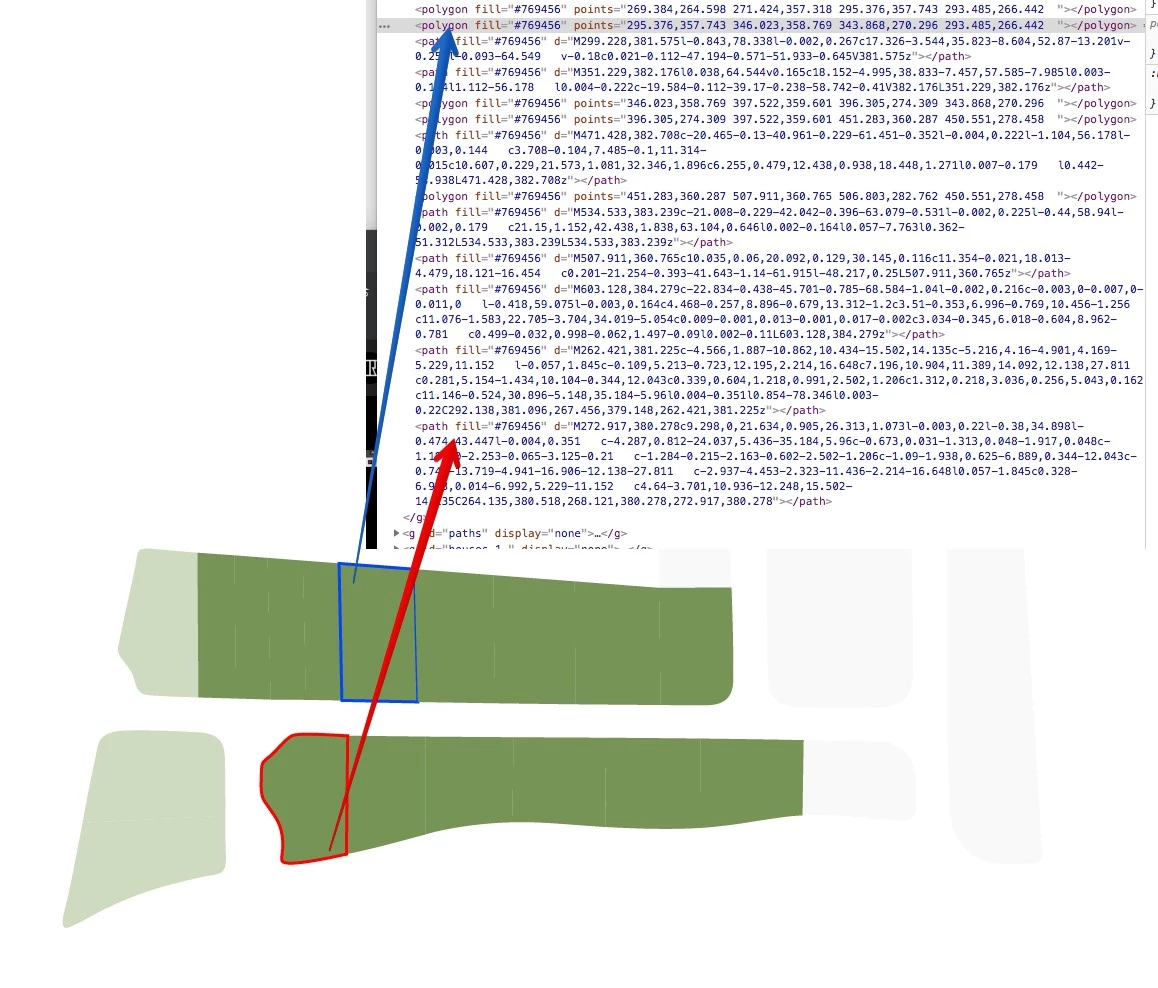
Hi, I have complex file and need it as .svg for future using on web page. It's actually a map where I need some shapes to have specific <tag>, one must be <path> other <polygon> or any other, but not <path>. For now some of "green shapes" are still polygons other paths, so is there any way to convert them to other style or vice versa? Didn't find any information or tool for this. Is there a way to do this? If not, why Adobe still didn't do that?
This topic is closed to new replies. Start a new post to keep the conversation going.
PhilippLehmannCorrect answer
Participant
Sep 14, 2024 9:22 AM UTC

For anyone that is somehow still searching for a solution to this problem: I had accidently added Effect > Distort & Transform > Zig Zag to a path that resulted in a polyline output. 
You can reduce the strenght of the effect to 0% / 1 segment and tadaaah! all polylines.

13 replies

PhilippLehmannCorrect answer
Participant
Sep 14, 2024 9:22 AM UTC

For anyone that is somehow still searching for a solution to this problem: I had accidently added Effect > Distort & Transform > Zig Zag to a path that resulted in a polyline output. 
You can reduce the strenght of the effect to 0% / 1 segment and tadaaah! all polylines.

Translate
artur-amparo
Participant
Sep 7, 2018 8:21 AM UTC
Is good practice to include your ai & OS version when posting, saves  time and gets you a resolution quicker.

Yeap, sorry for that.

Workstation is: iMac with OS X El Capitan (v10.11.6) and Illustrator CS4 (v14.0.0)

Translate
Mike_Gondek10189183
Community Expert
Community Expert
Sep 7, 2018 2:37 PM UTC

Please note you are running a much newer OS, and CS4 has never been updated for El Captian.

Older versions of Adobe Illustrator system requirements

So do not upgrade to High Sierrra if you plan on using CS4  as the farther you get away from the system requirements, the more issues you will have. Wanted to warn you as a very long process to downgrade your Mac OS.

If you just want to finish this project and whatever you have currently, you can download the CC trial as that work for 30 days i believe.

Translate
Larry G. Schneider
Community Expert
Community Expert
Sep 7, 2018 2:48 PM UTC

Mike, the trial period for Adobe was lowered to 7 days several years ago. Sorry.

Translate
Mike_Gondek10189183
Community Expert
Community Expert
Sep 5, 2018 6:09 PM UTC

Object >> Shape  >> Convert To Shape

Object >> Shape  >> Expand Shape

Translate
artur-amparo
Participant
Sep 6, 2018 9:32 AM UTC

Sorry but I don't have this menu:

Object >> Shape  >> Convert To Shape

Sorry I didn't notice, but I use CS4

Translate
Monika Gause
Community Expert
Community Expert
Sep 6, 2018 10:05 AM UTC

artur-amparo  schrieb

Sorry but I don't have this menu:

Object >> Shape  >> Convert To Shape

Sorry I didn't notice, but I use CS4

In that case you might want to edit your SVGs in a text editor.

Translate
Eric Dumas
Community Expert
Community Expert
Sep 5, 2018 4:36 PM UTC

Is it because of the nature of your design? a path contains curves and a polygon contains straight lines? What does your ideal result look like?

Translate
artur-amparo
Participant
Sep 6, 2018 9:25 AM UTC

best result for me is to assign one tag type for all the shapes in the picture, also I have same shapes (separately) in this .svg as black border lines, so border lines must have another tag type.

So as example colored shapes = "tag-1", black borders (as 1px black lines) = "tag-2", it can be any tags but main thing not same.

Hope you understood my idea.

Translate