


Inspiring
August 11, 2022
Answered

How to copy layer structure by number sequence?

  • August 11, 2022
  • 2 replies
  • 544 views

Hi,

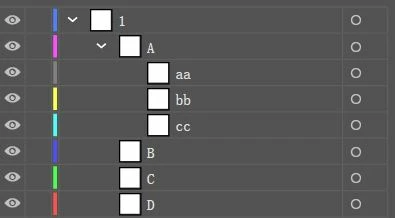
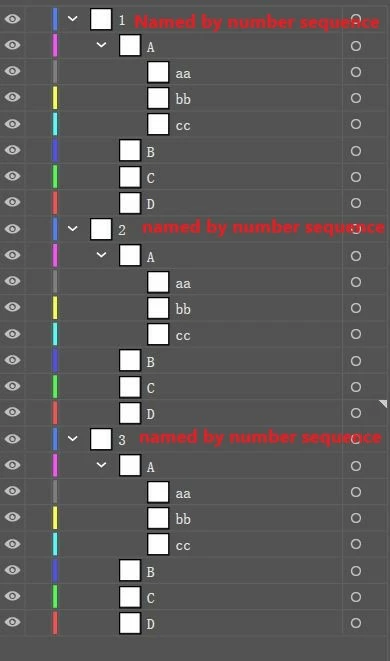
I have a layer structure. I want to copy it according to a number sequence, that is, copy 1, 2, 3, 4, 5, 6, 7, 8... 100 layers. Their structures are the same, but the main layer should be named according to the number sequence. 1, 2, 3, 4... Etc. the names of all other sub layers cannot be changed. I wonder if there is a script to implement it?
There is a "copy" command in the layer menu, which can copy the entire layer structure. However, the copied layer name will automatically add the word "copy", and the main layer name cannot be automatically named according to the number sequence. It needs to be modified one by one, including the names of all sub layers. This is a time-consuming work, so try to see if there is a script that can achieve this purpose. Thank you.


layer structure to copy:
 

Effect to be achieved:
 

This topic has been closed for replies.
Correct answer Sorontar

1. Rename main layer "X" Put one object inside every sublayer (aa bb  cc).
2. Select all objects inside layer X and copy

3. Rename the main layer to "1"

4. Paste while having "Paste remember layers" turned on from the layer menu

Now it thinks there is no layer "X" for example and it creates the whole structure as long as every sublayer has some object inside it. I does not add copy to the names. 
5. Now rename the new layer "X" to "2" and paste again and rename X to 3 and paste and repeat
Later you can easily delete all objects.

2 replies

rcraighead
Legend
September 24, 2022

This script automates the process @Sorontar has described. It requires an Illustrator action which is also included.
Required AI Action (load from "Action Panel" flyout menu: Load Actions)

dupLayerTest.ai (Use to test script) 

/**
• by Ray Craighead
• 'dupLayer' Function will duplicate first layer of active document "x" number of times numbering each layer sequentially.
• Requires Illustrator Action: Paste_Deselect, provided separately in .aia file.
• First layer in AI file must be named with a number.
**/
function dupLayer() {
    var aDoc = app.activeDocument;
    //deselect all
    selection = null;
    //Set number of layers required
    layerCount = prompt('Set number of layers', 20)
    //Capture name of top layer of current document in variable "layerName"
    var layerName = aDoc.layers[0].name;
    //Set variable "myLayer" to layer by that name
    var myLayer = aDoc.layers.getByName(layerName);
    //Select everything on "myLayer" (required for Action run with "doScript")
    myLayer.hasSelectedArtwork = true;
    //Copy selection to system clipboard
    app.copy();
    //loop through layers until layers equal more than "layerCount"
    while (aDoc.layers.length < layerCount) {
        myLayer.name = 'x';
        //doScript requires Illustrator Action "Paste_Deselect" in Action Folder: "AI Actions_KM_2"
        app.doScript("Paste_Deselect", "test");
        selection = null;
        //Set 2nd layer name to "layerName"
        aDoc.layers[1].name = layerName;
        //Set top layer name to "layerName + 1" (parseFloat function converts "layerName" to a number )
        aDoc.layers[0].name = parseFloat(layerName) + 1;
        layerName = aDoc.layers[0].name;
    }
    aDoc.layers[aDoc.layers.length-1].name = 1;
}
dupLayer();


SorontarCorrect answer
Inspiring
September 23, 2022

1. Rename main layer "X" Put one object inside every sublayer (aa bb  cc).
2. Select all objects inside layer X and copy

3. Rename the main layer to "1"

4. Paste while having "Paste remember layers" turned on from the layer menu

Now it thinks there is no layer "X" for example and it creates the whole structure as long as every sublayer has some object inside it. I does not add copy to the names. 
5. Now rename the new layer "X" to "2" and paste again and rename X to 3 and paste and repeat
Later you can easily delete all objects.