
Known Participant
November 24, 2021
Answered

How to create a cross from 1 part?

  • November 24, 2021
  • 6 replies
  • 899 views

Okay, probably my subject-title isn't very clear but I don't know how to put it (English is not my native language).

But I hope I can make clear with a sample what I mean.

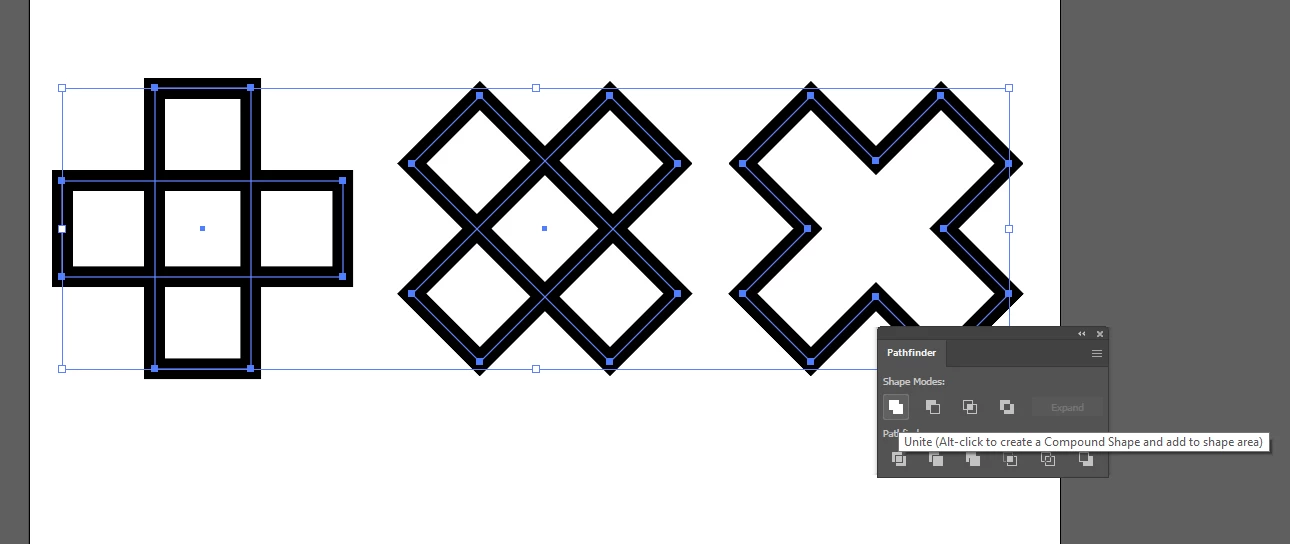
I want to create like something on the left. I now did this with several lines. But when I enlarge the thickness of the lines I see that the 'corners' show 'gaps'. How can I create like something on the left from 1 piece, so if I enlarge the thickness it won't show those 'gaps'.

 

This topic has been closed for replies.
Correct answer Doug A Roberts

Quickest way is probably to draw a rectangle, copy it, paste in place, rotate 90 degrees and then use Pathfinder > Unite:

6 replies

Jacob Bugge
Community Expert
Community Expert
November 25, 2021

Appelmoes,


I agree with Doug.


If you have a model shape, you can rotate that from cross to plus and create the first rectangle over that.


Otherwise, when you have rotated the two rectangles you can compare it to what you have or just see what you think of the shape; then unrotate and edit and rotate again until it is right.


And then you can unite.


As Ton said, your paths are unaligned, so I believe joining will give a funny look at the (non) corners.


AppelmoesAuthor
Known Participant
November 25, 2021

Thanks everybody for your help (and looking at some names (Jacob, Ton) I bet I also could have asked this in Dutch, haha.

So I tried what Larry suggested but then I got this result:


probably because I haven't got my anchor points alligned. I tried to do that, but I don't have enough knowledge to get that right. I know a lot about Photoshop, but when it comes to Illustrator, my knowledge is about 0,01%.

So then I tried what Doug suggested and that did the trick. So thank you all for your help.

Ton Frederiks
Community Expert
Community Expert
November 25, 2021

Good to hear that helped (for Jacob your name should have been Æblemos 🙂

Kurt Gold
Community Expert
Community Expert
November 24, 2021

I agree with anyone and anything.


Just in case there is some reason to make the cross with separate line segments, you may use projecting caps (see Stroke palette).


Ton Frederiks
Community Expert
Community Expert
November 24, 2021

I agree with Larry too, but make sure that the anchor points are aligned.

Inspiring
November 24, 2021

I agree with Larry.  Close the Paths.

Doug A Roberts
Community Expert
Doug A RobertsCommunity ExpertCorrect answer
Community Expert
November 24, 2021

Quickest way is probably to draw a rectangle, copy it, paste in place, rotate 90 degrees and then use Pathfinder > Unite:

Larry G. Schneider
Community Expert
Community Expert
November 24, 2021

Try selecting all the parts of the cross and Cmd (Ctrl)-J. It should join the lines as a closed path.