
Participant
February 5, 2021
Answered

How to create a curved line with perspectives?

  • February 5, 2021
  • 1 reply
  • 4638 views

Hello guys,


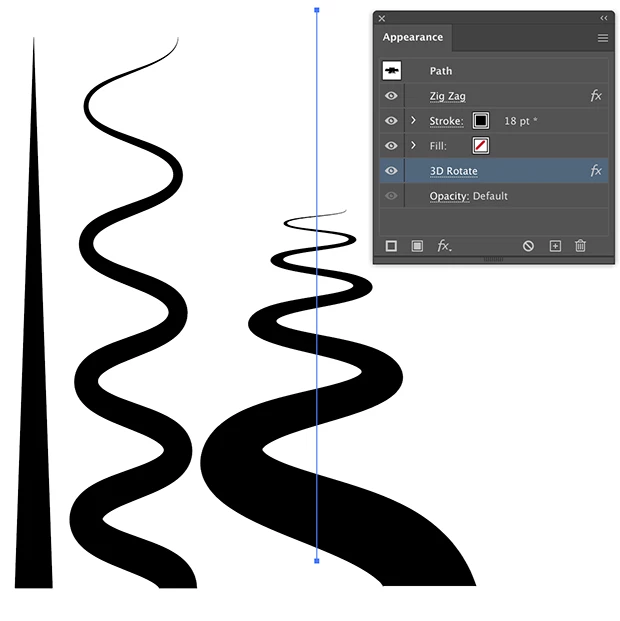
I would like to create a curved line (kinda like a street) that starts at the bottom, includes like 4-5 curves towards the middle of the picture but in a perspective so the bottom/front of the line is thicker and the line vanishes/gets thinner at some point towards the middle of the picture/the back. 


This is probably not the best way to descirbe what I need so I attach an example of what I have in mind.


I started creating forms like a snake and use the transform (alt button) method to kinda bring it in perspective in photoshop but the line will come out as blurry in the end so I'd prefer doing it in illustrator but don't manage to recreate a shape similar to what you can see in the picture.


If anyone has any advice and/or could explain how something like that is done, I'd appreciate a lot!


So thanks already and have a nice weekend!
This topic has been closed for replies.
Correct answer Ton Frederiks

You could try a line with a width profile, a Zig Zag effect and a 3D Rotate effect (with perspective).

1 reply

Ton Frederiks
Community Expert
Ton FrederiksCommunity ExpertCorrect answer
Community Expert
February 5, 2021

You could try a line with a width profile, a Zig Zag effect and a 3D Rotate effect (with perspective).

Lisa5CB9Author
Participant
February 5, 2021

Oh wow - that's a really nice way and also very easy to do! Thanks a lot! :))


To distort it more in the way I'd like, I copy it in Photoshop and use my already mentioned "method" (ctrl + t and then moving the corner while holding the alt button).


Is there a similar way to do that in Illustrator so I keep the sharpness of the line? In Photoshop it gets slightly blurry on the edges but still totally usable for my case.


Hugh Betcha
Legend
February 5, 2021

Another idea is to create the road or whatever in 'bird's eye' view, then use 3D extrude (with no extrude applied), and just a perspective angle.