
BenSCR
Inspiring
January 25, 2019
Answered

How to create a HUD shape in Illustrator?

  • January 25, 2019
  • 7 replies
  • 3661 views

How can I get a 'HUD' type shape like the below picture, so it's shaped like a egg instead of the standard circle?
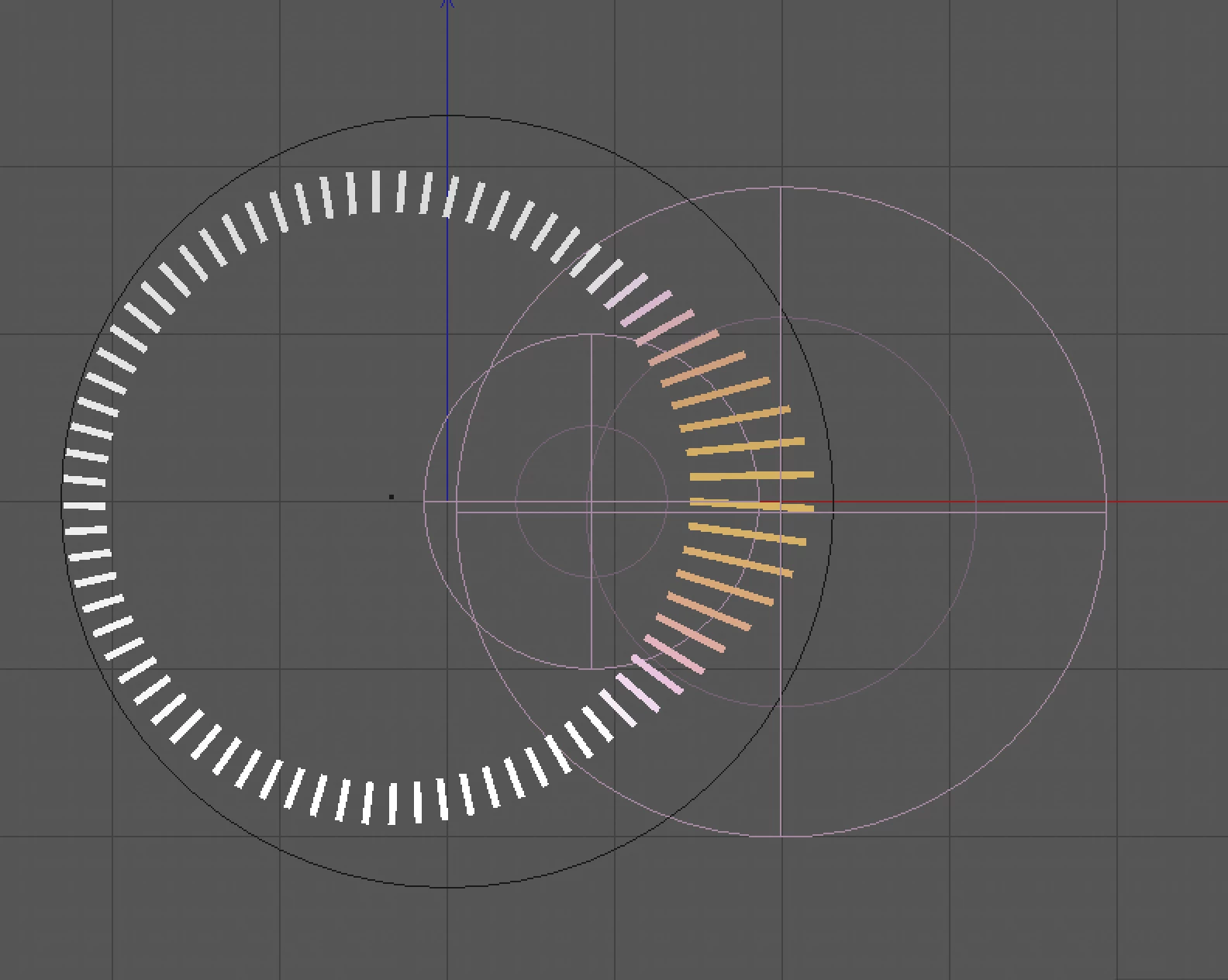
    This topic has been closed for replies.
    Correct answer carlosgarro

    To complete kdmemory  explanation here's a quick video with one technique to build the HUD.

    https://drive.google.com/file/d/1k5fLbGqRJEiX4pQy0I0ivCCfCgywx3iu/view?usp=sharing

    7 replies

    carlosgarro
    Community Expert
    Community Expert
    January 28, 2019

    Now we can write a book about "How to Create a HUD with Adobe Illustrator!" LOL

    tromboniator
    Community Expert
    Community Expert
    January 28, 2019

    I love it when we can find 65 ways to accomplish a task.

    Jacob Bugge
    Community Expert
    Community Expert
    January 28, 2019

    To sort of add another (cookbook) one, it is also possible to start with a Polar Grid of a suitable size and with 0 Concentric Dividers and a suitable number of Radial Dividers, then create the desired fried egg shape and subtract the yoke part, then using a Clipping/Opacity Mask or Pathfinder to just keep the (egg) white part with stripes.

    Participating Frequently
    January 28, 2019

    If you don't want any masks, try these steps.

    Myra Ferguson
    Community Expert
    Community Expert
    January 28, 2019

    Similar to Peter's idea, you could

    1. Make a single stroke to use for a Pattern brush (the one I made used a fixed scale and spacing at 500%)

    2. Make a circle

    3. Apply the brush to the circle

    4. Make your egg shape like Klaus suggested then fill it

    5. Use the egg as a Transparency mask (fill it with white with no stroke, select the egg shape and the stroked circle, go to the Transparency panel and select Make Mask)

    tromboniator
    Community Expert
    Community Expert
    January 27, 2019

    And yet another way is to

    1) Build and save a stroke profile using the Width tool and the Stroke panel.

    2) Draw a circle with a dashed stroke, then apply the stroke profile, or

    3) Make a pattern brush from a vertical line segment, apply it to a circle, then apply the stroke profile.

    Some adjustments to the brush or the dashed stroke definitions will probably be necessary

    Peter

    carlosgarro
    Community Expert
    carlosgarroCommunity ExpertCorrect answer
    Community Expert
    January 26, 2019

    To complete kdmemory  explanation here's a quick video with one technique to build the HUD.

    https://drive.google.com/file/d/1k5fLbGqRJEiX4pQy0I0ivCCfCgywx3iu/view?usp=sharing

    Monika Gause
    Community Expert
    Community Expert
    January 26, 2019

    Using a blend between some objects that each have invisible "helper" objects.

    Then swap the blend spine:

    Inspiring
    January 26, 2019

    Monika, I've never seen the use of invisible helper objects in a blend! Based on the image you've posted, I assume they're no-stroke/no-fill objects. But I can tell neither what they're doing nor how exactly you use them. Are they included in the blend? Which objects are being blended exactly? And to the real point, I can see they're forcing some sort of curvature in the blend (without which there would be a "straight edge" ramping from the end objects to the middle one). But why and how?

    Can you enlighten  me? Either with a brief explanation or a link somewhere? Thank you.

    kdmemory
    Inspiring
    January 26, 2019

    Hi BenSCR

    If you mean the basic egg shape, just use the Ellipse Tool (L), press Shift and draw a circle. Then use the Direct Selection Tool (A) and select the right anchor point of the circle object. Now can use the mouse or better the arrow keys of your keyboard to force the anchor point as far to the right as you want. (Of course you can do that basically to any side you like).

    Too easy. But you probably mean how to get the stripes as in your graph, well that I don't know.

    Klaus