
Participant
March 15, 2017
Question

How to create a repeatable, precise warp for images printed on stretch fabric

  • March 15, 2017
  • 1 reply
  • 401 views

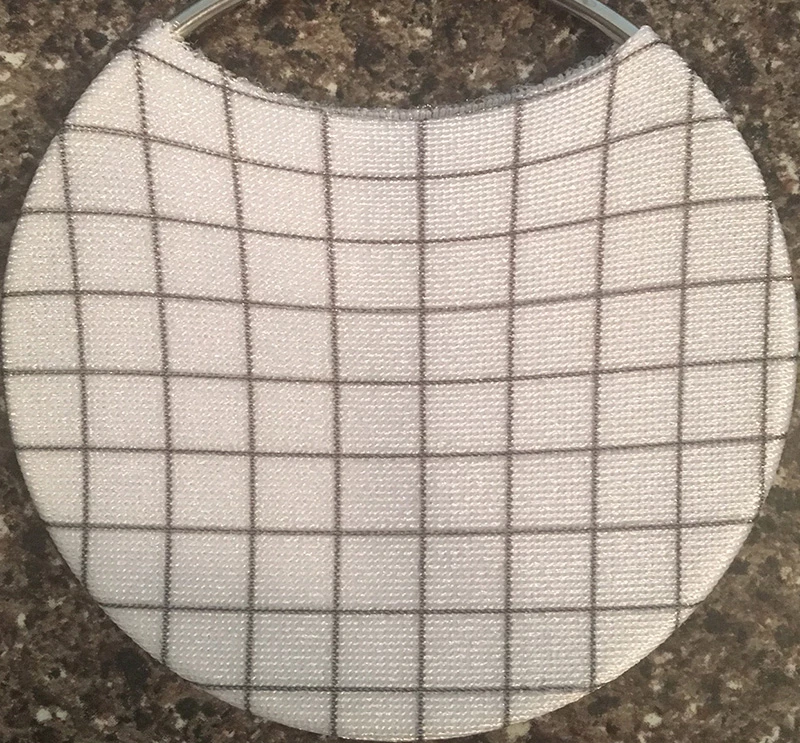
Hi everyone! I am printing images on spandex. The spandex is then stretched over a circle, which causes a lot of distortion to the image. How can I warp the images in illustrator so that they do not look distorted when stretched over the circle? I have been trying an envelope distort but having trouble.  I will need to apply the exact same effect to many images. Any guidance would be greatly appreciated! Here is an image of what perfectly square grid looks like stretched over the circle.
This topic has been closed for replies.

1 reply

Participant
March 15, 2017

depends on the fabric.

for example: 95% polyester 5" spandex

if the elastic is both warp and weft ( up/down and left right) you would use the fish eye filter)

but yours looks like like the elasticity issue is  mainly up/down, I would suggest using a simple bulge on a square grid, then mask using the circle.

yours has a special issue because of the insert whole, only the top half of the circle is truly distorted

bottom is normal, then the top will be bulged

actSpiritAuthor
Participant
March 16, 2017

Thank you for your response! The insert hole is definitely what's making this difficult! I will need to warp images and text, vectors as well as pngs that cover most of the circle, so I am not sure how to approach applying a bulge to only part of a graphic. Sometimes a pattern will cover the whole area. Thank you so much for taking the time to think about my problem. I would really appreciate any additional thoughts you might have.

Participant
March 16, 2017

I suggest using photoshop,

it will let you do image mapping, and make it easily repeateable