
Participant
June 12, 2024
解決済み

How to create a scribble effect like embroidery that follows the curvature of the shape?
  • June 12, 2024
  • 返信数 3.
  • 2083 ビュー


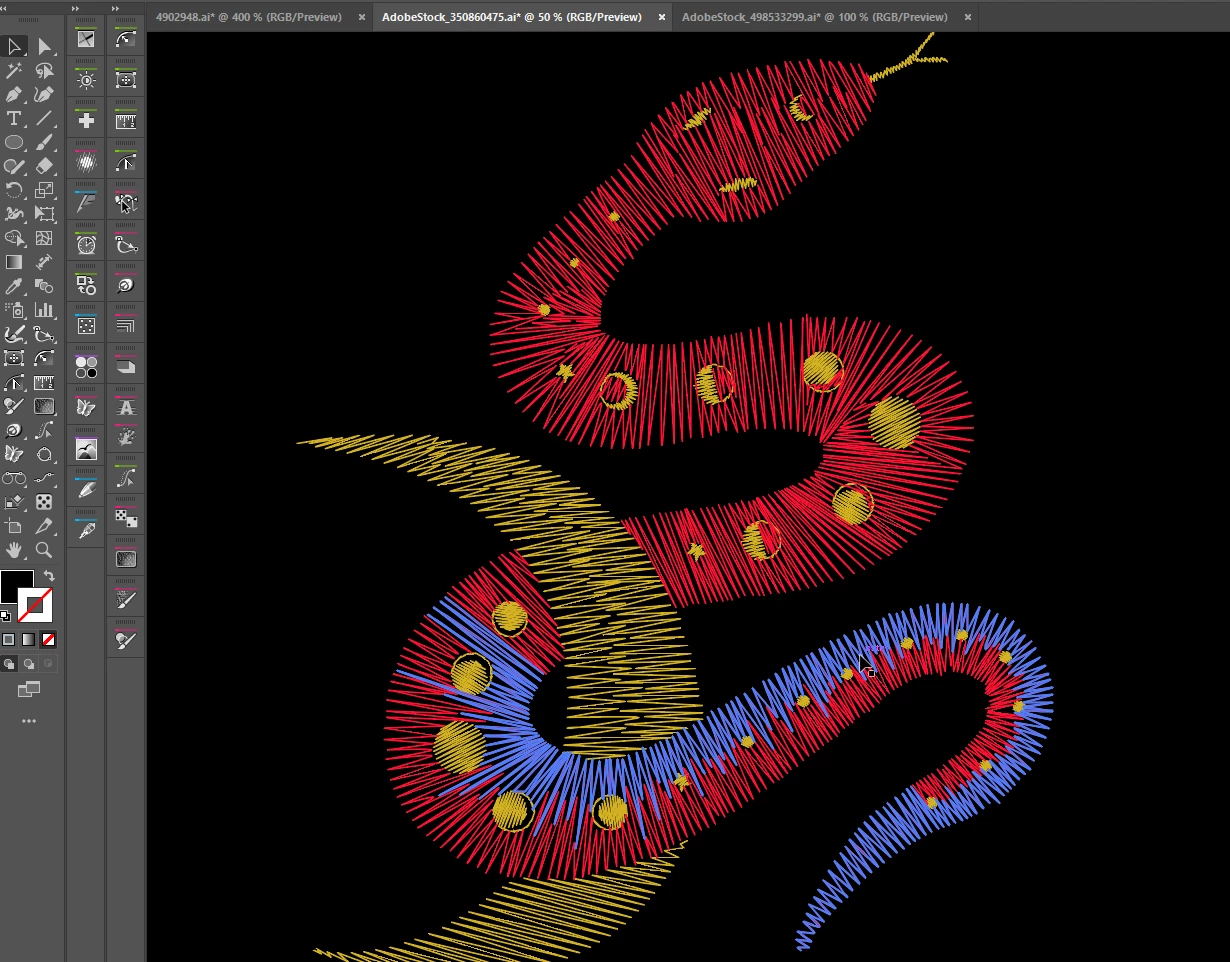
Could you help me achieve this look on a vector file? Please don’t suggest those extremely expensive embroidery software programs. I only need this look for my digital design and don’t plan to create a physical embroidery.


I can't believe that nobody has found an easy solution for this in the last 15 years. I've searched the internet over and over, but haven't found a straightforward way to accomplish this.


I was able to partially replicate the effect with a scribble tool, but it looks very unrealistic because the angle of the scribble remains the same across the shape. I’m not sure how to achieve the same effect with the scribbles following the curvature of the shape instead of maintaining a constant direction.


If it is very hard to accomplish, can I suggest to the developers to create a dynamic random angle in the scribble effect that follows the shape?

このトピックへの返信は締め切られました。
解決に役立った回答 Kurt Gold

Another rough or even delicate approach is to use the Zig Zag effect in conjunction with the Roughen effect, applied to stroked paths. Variations may be achieved by additionaly using Envelope Distorts.


Also, don't underestimate the capabilities of custom scatter brushes.

返信数 3

Kurt Gold
Community Expert
Kurt GoldCommunity Expert解決!
Community Expert
June 12, 2024

Another rough or even delicate approach is to use the Zig Zag effect in conjunction with the Roughen effect, applied to stroked paths. Variations may be achieved by additionaly using Envelope Distorts.


Also, don't underestimate the capabilities of custom scatter brushes.

Participant
June 14, 2024

Thanks I will try it

Community Expert
June 12, 2024

I'm sorry to say the only fast way to re-create that kind of effect accurately is by using an embroidery plugin. It's possible to create somewhat similar looking effects using other methods. Blends along paths might do okay, if not create a good starting point. The same goes for art brush effects. The Space Fill feature in Astute Graphics' ColliderScribe plugin might do okay as well. But the real trick is having all those open path lines connected into longer zig-zag paths. Embroidery software is the thing I can think of that does that.

Monika Gause
Community Expert
Community Expert
June 12, 2024

An art brush can do that.

Monika Gause
Community Expert
Community Expert
June 12, 2024

Did you already check out brushes?


Like this. Scrible effect, Expand appearance, but not the stroke, Brushes panel. https://youtu.be/DK_G6Kk5bBM


You need to first measure the brush to get the exact length for the brush

Participant
June 14, 2024

Thanks for the answer. I know that trick, but it would only be applicable to a snake-like shape and wouldn’t work for other shapes. However, I’m looking for a solution that can be applied to any shape.

Monika Gause
Community Expert
Community Expert
June 14, 2024

Which "any shape" would you need?