Participant
April 25, 2025
Answered

How to create a smooth opacity gradient without a noticeable edge

  • April 25, 2025
  • 1 reply
  • 267 views


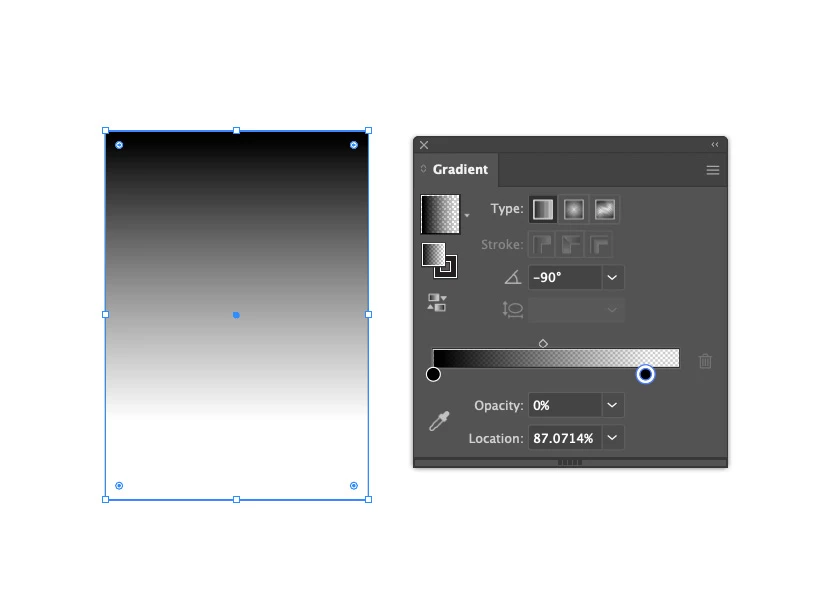
Im trying to create a smooth opacity transition of an object. But illustrator always displays a clear edge wherever I move the stop. How do I make this a smoother transition? see ecample below:

Correct answer Rene Andritsch

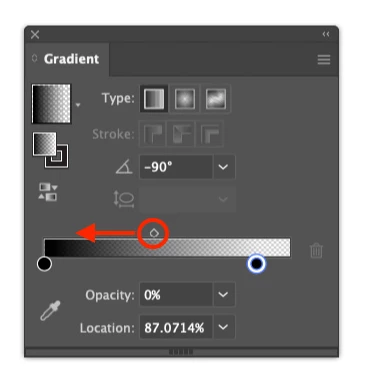
@Andrew28736415na6p try moving the midpoint (diamond shape) further to the left. Also you have two black color stops. Try it with a white color stop on the right. That might also help (but it will also change your gradient slightly). This is kind of a trial and error scenario where you have to experiment a little.

1 reply

Rene Andritsch
Community Expert
Rene AndritschCommunity ExpertCorrect answer
Community Expert
May 13, 2025

@Andrew28736415na6p try moving the midpoint (diamond shape) further to the left. Also you have two black color stops. Try it with a white color stop on the right. That might also help (but it will also change your gradient slightly). This is kind of a trial and error scenario where you have to experiment a little.