
Answered
How to create a textRange box with the swatch name in it?
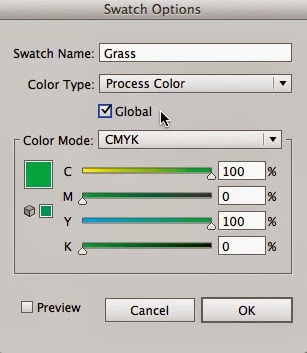
Hello. I'm completely new to illustrator scripting (started yesterday) and I have a question. I'm writing a script for my work to automatically generate art proofs and for each color in the art, I am creating a new square on the proof and filling it with the color and then I want to write the color underneath it. For example if a piece of art had the color Pantone 122 C I would want to create a text box underneath a square that said "Pantone 122 C". Is there a way to output the swatch name you see when you double click on a swatch and it gives you the swatch option popup (pictured below)? I haven't been able to figure it out and just trying to output the swatch name doesn't work.
Thanks!
 AdChoices