Andreas Keppler
Inspiring
September 14, 2020
Answered

How to create cogs in Illustrator

  • September 14, 2020
  • 5 replies
  • 4308 views

Hi,

I have to make a technical illustration in Illustrator. It should show the main drive of a car. That means some cogs driven by a toothed belt. But how to design cogs with rounded teeth? All descriptions and tutorials show solutions using circles and stars – but the outcome always contains sharp edges. In my illustration the cogs have to have round edges (like the cogs of a bicycle).

Help!!
This topic has been closed for replies.
Correct answer Monika Gause

Hi Monika, wie runde ich denn Ecken in Illustrator? Ich habe dein Buch "Illustrator CC". Dort zeigt auf Seite 598 die Abb. 17.59 die Zahnkränze eines Fahrrads. Wie macht man die?


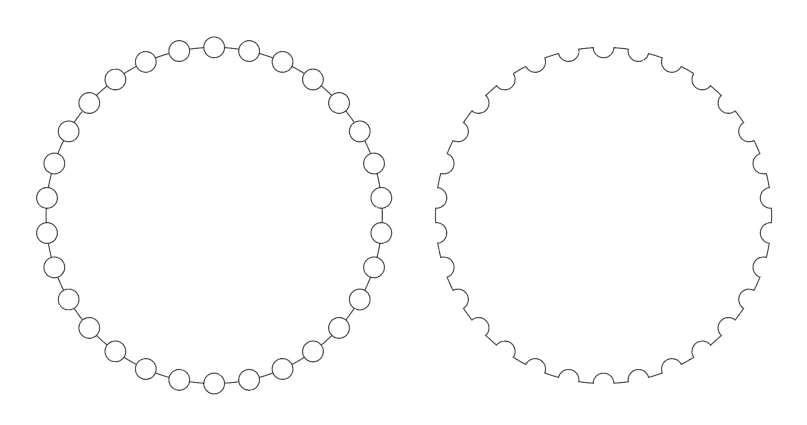
Diese Zahnkränze habe ich konstruiert.


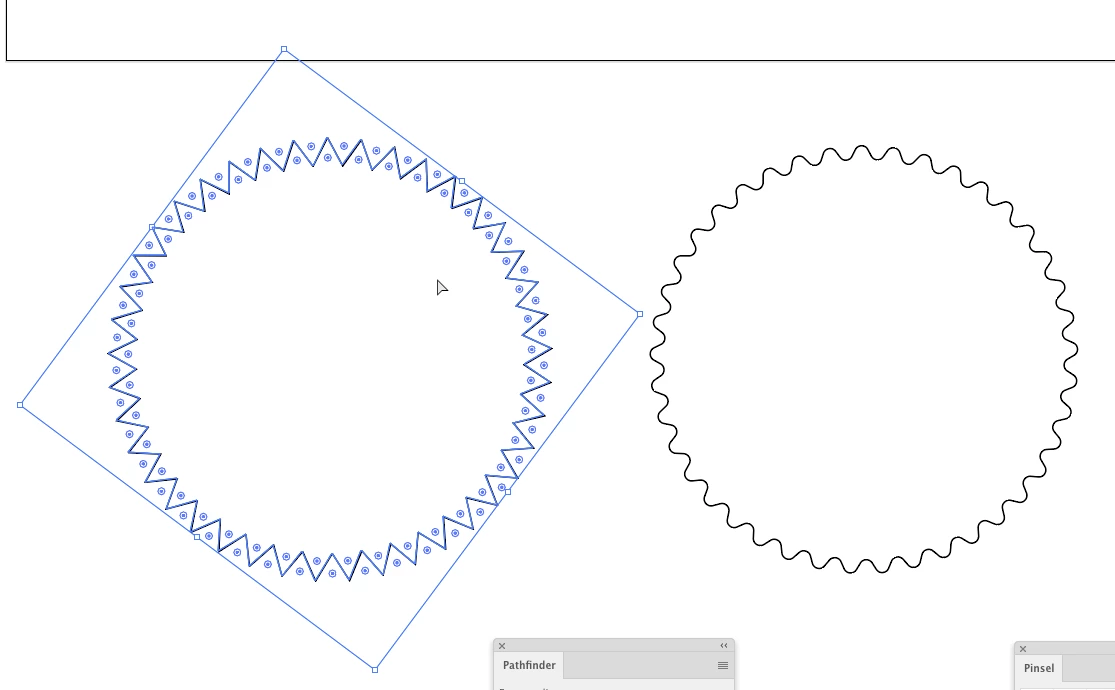
nur so geht das exakt. Ein Musterpinsel würde immer verzerrt werden, wenn der Pfad in Kurven geht.

Einen Stern runden geht mit dem Ecken-Widget: Stern aktivieren und dann mit dem Direktauswahl-WZ das Widget ziehen:


Ich konnte das in dem Beispielbild nicht so genau sehen, aber einige der Zahnräder sahen so aus (es sei denn, diesind im Detail noch etwas anders)

5 replies

Kurt Gold
Community Expert
Community Expert
October 18, 2020

The mechanic who will probably have to do the maintenance work for this thing may earn a lot of money in case the entire construction is built based on your final illustration.

Kurt Gold
Community Expert
Community Expert
September 15, 2020

Below is an older graphic style approach. Some fun to play with.


https://drive.google.com/file/d/1UzG0FRHkpYvR-GX5CRTrWw6qnhpS4i4F/view?usp=sharing


Andreas Keppler
Inspiring
September 16, 2020

Hi you guys, thanks a lot for your support. The drawing is making progress. The components are nearly done. Just the toothed belt is missing (see the attachment). But ... there is one more thing: As you see in the other attachment – showing a part of a pump – there is this "line structure" (German: "Schraffur"). How do I do that?

Monika Gause
Community Expert
Community Expert
September 16, 2020

I assume the tooths of that belt should not be distorted. You could use a combination of a scatter brush (Spezialpinsel) and a simple stroke to create it. Apply two strokes in the appearance panel for that.

As for the Schraffur: use a pattern. You can create a horizontally striped pattern with the pattern editing mode, then apply it and rotate it when it's applied to the shape.

Ton Frederiks
Community Expert
Community Expert
September 15, 2020

This may also be useful for creating gears:

When looking for a script I stumbled upon this gear script from Jongware, the Gyro Gearloose of scripting.

It was mentioned here: https://community.adobe.com/t5/indesign/scriptui-for-dummies/m-p/2970630?page=2

You can download it from his web site: http://www.jongware.com/binaries/gearup.zip

Andreas Keppler
Inspiring
September 15, 2020

Hi Ton, thanks a lot for your proposal. But anything about programming for my mind is completely out of reach. Monika's solution works well in my project. Greetings from Stuttgart.

Doug A Roberts
Community Expert
Community Expert
September 15, 2020

The script is very user-friendly. It simply opens a dialog window where you can set the parameters of your gear.

Andreas Keppler
Inspiring
September 14, 2020

Monika Gause
Community Expert
Community Expert
September 14, 2020

You could start with a star and then round all the corners. Does that not work?

Andreas Keppler
Inspiring
September 14, 2020

Hi Monika, wie runde ich denn Ecken in Illustrator? Ich habe dein Buch "Illustrator CC". Dort zeigt auf Seite 598 die Abb. 17.59 die Zahnkränze eines Fahrrads. Wie macht man die?

Doug A Roberts
Community Expert
Community Expert
September 14, 2020

The best way is probably to create a pattern brush from something similar to the path at the top. Then you can fine-tune the shape:

Andreas Keppler
Inspiring
September 14, 2020

Hi Doug, thanks a lot. I'll try that.