Participating Frequently
September 24, 2025
Answered

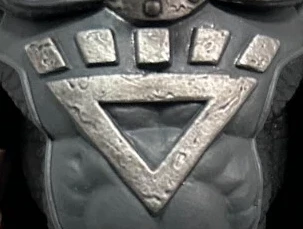
How to create the squares above the triangle shape?

  • September 24, 2025
  • 3 replies
  • 299 views

I understand the basics, but I'm having difficulty creating the right angles in the gaps between the squares, any help please?

 

Correct answer Tina_Irvine

I had made a video before I noticed a response 🙂  Not sure if it helps at this point, but I'll add it just in case you need a hand to get started.


Please ignore the cursor flickering (it does that when I screen record).

3 replies

Kurt Gold
Community Expert
Community Expert
September 24, 2025

You can also draw some evenly distributed rectangles and use the Free Transform tool in perspective mode while the reference point is located at the bottom peak of the triangle.


Tina_Irvine
Community Expert
Tina_IrvineCommunity ExpertCorrect answer
Community Expert
September 24, 2025

I had made a video before I noticed a response 🙂  Not sure if it helps at this point, but I'll add it just in case you need a hand to get started.


Please ignore the cursor flickering (it does that when I screen record).

MadorasAuthor
Participating Frequently
September 24, 2025

Hello Tina, thanks a lot for taking your time to make a video guide for this, I greatly appreaciate it! I definitely understand it now! 🙂 

Tina_Irvine
Community Expert
Community Expert
September 24, 2025

@Madoras,

You're welcome. I'm so glad it helped 🙂

Monika Gause
Community Expert
Community Expert
September 24, 2025

These cannot be built from squares or rectangles. 

Instead you could draw lines to a common point and then go on from there. drawing the lines at the top and bottom and then using the shapebuilder tool.


MadorasAuthor
Participating Frequently
September 24, 2025

Alright, thanks a lot!