
FreDiabetics
Inspiring
July 11, 2020
Answered

How to create this icon

  • July 11, 2020
  • 2 replies
  • 480 views

Hey Guys, I want to re create this Iocn, can anybody tell me where to start? 


Thanks in advance 



{Renamed by MOD}

 

This topic has been closed for replies.
Correct answer Scott Falkner

Put the logo on its own layer then make that a Template layer. Template layers are faded, non-printing, and show even in Artwork view, which normally shows paths as black hairlines, no fills, and placed images don't preview. Use another layer for your drawing and switch to Artwork view and trace using the Pen tool.
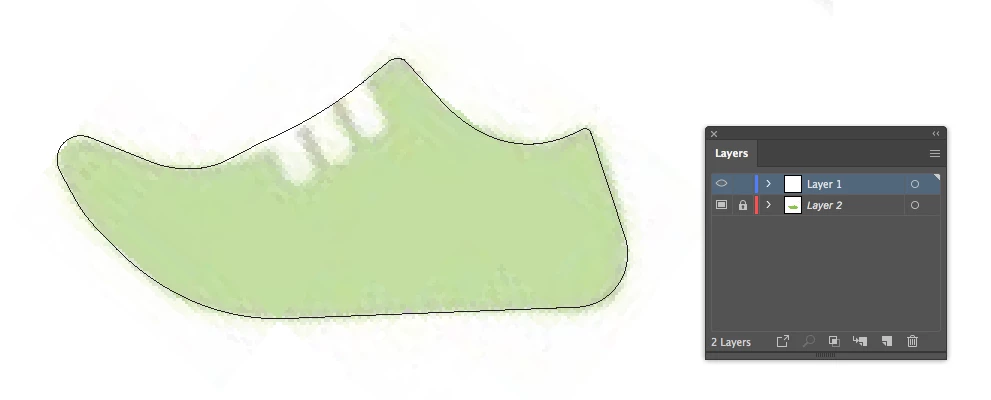
This took me about 1 minute.


The pen tool is Illustrator’s more useful tool, but it takes some learning to get good and predictable results. Search for Illustrator Pen Tutorial and you’ll find lots of videos on Youtube and Lynda.

2 replies

Ashutosh_Mishra
Inspiring
July 18, 2020

Hi there,


Thanks for reaching out. I hope you found your answer.
We'd appreciate if you can mark the appropriate response correct. If you used any other method, you can share it with us. It'll help other users with similar concern.

Let us know if you have any other concern, we'll be happy to help.


Regards,

Ashutosh

Scott Falkner
Community Expert
Scott FalknerCommunity ExpertCorrect answer
Community Expert
July 12, 2020

Put the logo on its own layer then make that a Template layer. Template layers are faded, non-printing, and show even in Artwork view, which normally shows paths as black hairlines, no fills, and placed images don't preview. Use another layer for your drawing and switch to Artwork view and trace using the Pen tool.

This took me about 1 minute.


The pen tool is Illustrator’s more useful tool, but it takes some learning to get good and predictable results. Search for Illustrator Pen Tutorial and you’ll find lots of videos on Youtube and Lynda.

FreDiabetics
Inspiring
July 12, 2020

Great man,  I will try that immediatley. 


Thanks in advance 🙂 Have a nice sunday