
New Participant
February 21, 2018
Question

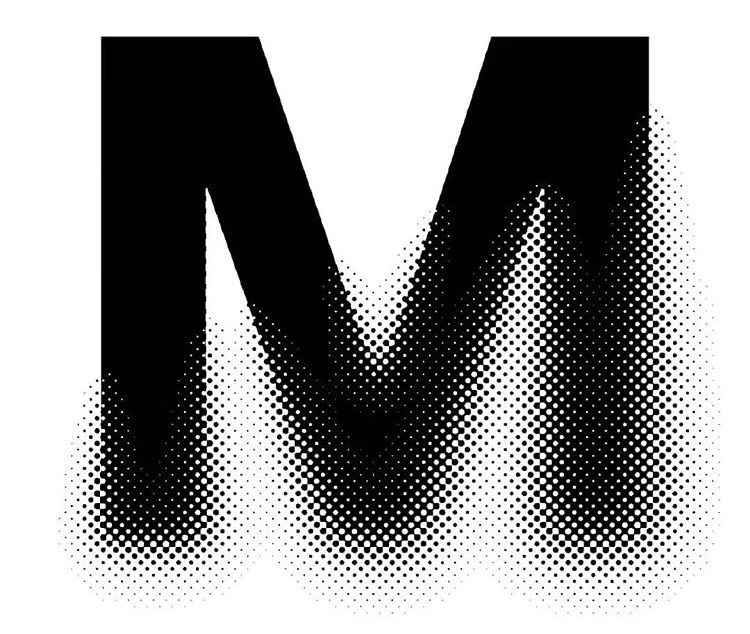
How to create this? Probably need to use halftone pattern
  • February 21, 2018
  • 3 replies
  • 1339 views

I wanted to design with halftone like the first one. It looks so cool.

I know how to use color halftone but when I did, I couldn't control a direction of dots.

So looks so ugly. the second one is what I tried. I'll appreciate if you teach me how to create like that. It doesn't matter illustrator or photoshop.

Thanks

This topic has been closed for replies.

3 replies

rcraighead
Braniac
February 21, 2018

I realize this is simply solved in PS, but I wanted to see what could be done only in AI. The catch is that AI is missing a "Threshold" effect. The closest I could find was the "Stamp" effect. Oh well.

Without "Stamp" effect.

With Stamp Effect.

Garry Bradley
Inspiring
February 22, 2018

Looks like Astute's Phantasm filter in Illustrator to me, so many options and most likely the answer. Involves money unfortunately but they may have a free trial.

Mario Arizmendi
Braniac
February 21, 2018

I think this effect was done with some kind of plugin, but  here is how you can do something similar manually in photoshop

Monika Gause
Braniac
February 21, 2018

You would first need to blur the bottom of it (would best be done in Photoshop

Then apply a halftone effect to the bottom half (Can be done in Photoshop or Illustrator) If you want this to be vector dots, then most smoothly would be to use the plugin Phantasm.

hyedyAuthor
New Participant
February 21, 2018

Thanks! I did as you said. but looks similar but there is a difference..

Could you see the edge? I tried use Blending mode. but it was not working

the first one is mine.

Monika Gause
Braniac
February 21, 2018

The second one is a true halftone dither.

You can only get that in Photoshop: by converting to grayscale and then converting to bitmap. You will need a rather high resolution of the file combined with a rather low frequency setting in the bitmap conversion settings.