


Participant
December 27, 2025
Answered

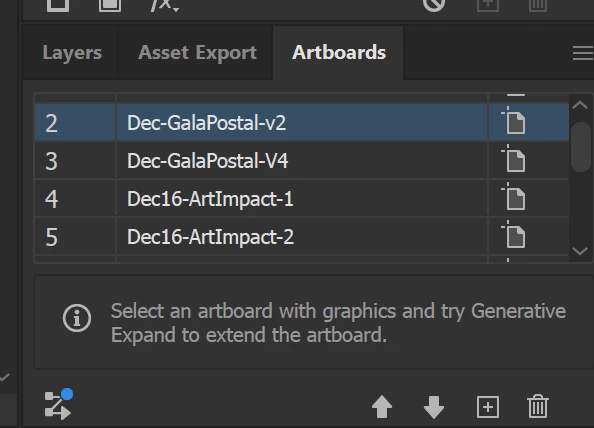
How to deactivate the "Generative Expand" advertisement from the Artboards panel.

  • December 27, 2025
  • 2 replies
  • 132 views

There is a useless advertisement at the bottom of the artboards panel, I don't want the function and the "i" button doesn't even do anything. I really need that space, my toolbars are already packed. 
 

I can't find an option in the prefference menus to deactivate this. Does anybody know how to deactivate this? Please help me. Thanks.
 

871808i5EAAD50DB6685B7C.png


Correct answer Kurt Gold

The latest versions of Illustrator (e.g. 30.1) do not have this note in the Artboards panel anymore.

2 replies

Kurt Gold
Community Expert
Kurt GoldCommunity ExpertCorrect answer
Community Expert
December 27, 2025

The latest versions of Illustrator (e.g. 30.1) do not have this note in the Artboards panel anymore.

Participant
December 27, 2025

OK, the solution is to make a new artboard in one of you files, put random shapes on it, reactivate the contextual bar (window/contextual task bar) use the useless slop "generative expand button" select one of the slop options, select combine, etc, clap for five seconds convincingly,  MAKE SURE TO SAVE THE FILE, close and restart illustrator and it will have gone away. You can deactivate the nagging bar again.

Thanks for wasting an hour of my life for functionality I had before, Adobe. I love you.