Known Participant
August 11, 2025
Answered

How to define values in Action menu command?

  • August 11, 2025
  • 2 replies
  • 242 views

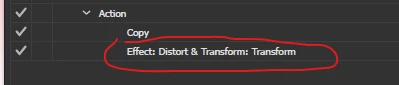
I am creating an action where I am using a menu command, I have added the distort and transform effect from the effect menu. 

Although this is added, but I am unable to pre-define a set of values here. Right now, It is just getting added.

How to achieve that?


Correct answer sttk3

Not possible in Action as far as I know, but ExtendScript can set effects via applyEffect.


The following code adds a transform effect that scales the selected item to 200% of its width, based on the top left corner.

/**
  * @File applyEffect sample
  * @3653945.0.0
  * @7111211 sttk3.com
*/

(function() {
  if(app.documents.length <= 0) {return ;}
  var doc = app.documents[0] ;
  var sel = doc.selection ;
  if(sel.length <= 0) {return ;}
  
  var scaleH_Percent = 200 ;
  var scaleV_Percent = 100 ;
  var attrData =
       'R scaleH_Percent ' + scaleH_Percent
    + ' R scaleV_Percent ' + scaleV_Percent
    + ' R scaleH_Factor ' + (scaleH_Percent / 100)
    + ' R scaleV_Factor ' + (scaleV_Percent / 100)
    + ' R moveH_Pts 0'
    + ' R moveV_Pts 0'
    + ' R rotate_Degrees 0'
    + ' R rotate_Radians 0'
    + ' B transformObjects 1'
    + ' B transformPatterns 0'
    + ' B scaleLines 0'
    + ' B reflectX 0'
    + ' B reflectY 0'
    + ' B randomize 0'
    + ' I pinPoint 0'
    + ' I numCopies 0'
  ;
  var xml = <LiveEffect name="Adobe Transform">
      <Dict data={attrData}/>
    </LiveEffect> ;
  XML.prettyPrinting = false ;
  var effectXML = xml.toXMLString() ;

  sel[0].applyEffect(effectXML) ;
})() ;


2 replies

Silly-V
Legend
August 14, 2025

If you say predefined in such a way that you could capture them as graphic styles, then actions could at least apply the graphic style by name.

sttk3Correct answer
Legend
August 12, 2025

Not possible in Action as far as I know, but ExtendScript can set effects via applyEffect.


The following code adds a transform effect that scales the selected item to 200% of its width, based on the top left corner.

/**
  * @File applyEffect sample
  * @3653945.0.0
  * @7111211 sttk3.com
*/

(function() {
  if(app.documents.length <= 0) {return ;}
  var doc = app.documents[0] ;
  var sel = doc.selection ;
  if(sel.length <= 0) {return ;}
  
  var scaleH_Percent = 200 ;
  var scaleV_Percent = 100 ;
  var attrData =
       'R scaleH_Percent ' + scaleH_Percent
    + ' R scaleV_Percent ' + scaleV_Percent
    + ' R scaleH_Factor ' + (scaleH_Percent / 100)
    + ' R scaleV_Factor ' + (scaleV_Percent / 100)
    + ' R moveH_Pts 0'
    + ' R moveV_Pts 0'
    + ' R rotate_Degrees 0'
    + ' R rotate_Radians 0'
    + ' B transformObjects 1'
    + ' B transformPatterns 0'
    + ' B scaleLines 0'
    + ' B reflectX 0'
    + ' B reflectY 0'
    + ' B randomize 0'
    + ' I pinPoint 0'
    + ' I numCopies 0'
  ;
  var xml = <LiveEffect name="Adobe Transform">
      <Dict data={attrData}/>
    </LiveEffect> ;
  XML.prettyPrinting = false ;
  var effectXML = xml.toXMLString() ;

  sel[0].applyEffect(effectXML) ;
})() ;