


loris55283829
Participant
September 5, 2018
Answered

How to delete black lines inside pen-tool shape ?

  • September 5, 2018
  • 2 replies
  • 2330 views

Hey guys I m quite a beginnner and actually no matter how hard I try I cannot find any answer to this online.

This is the problem I came across:

Premise: I created this path:
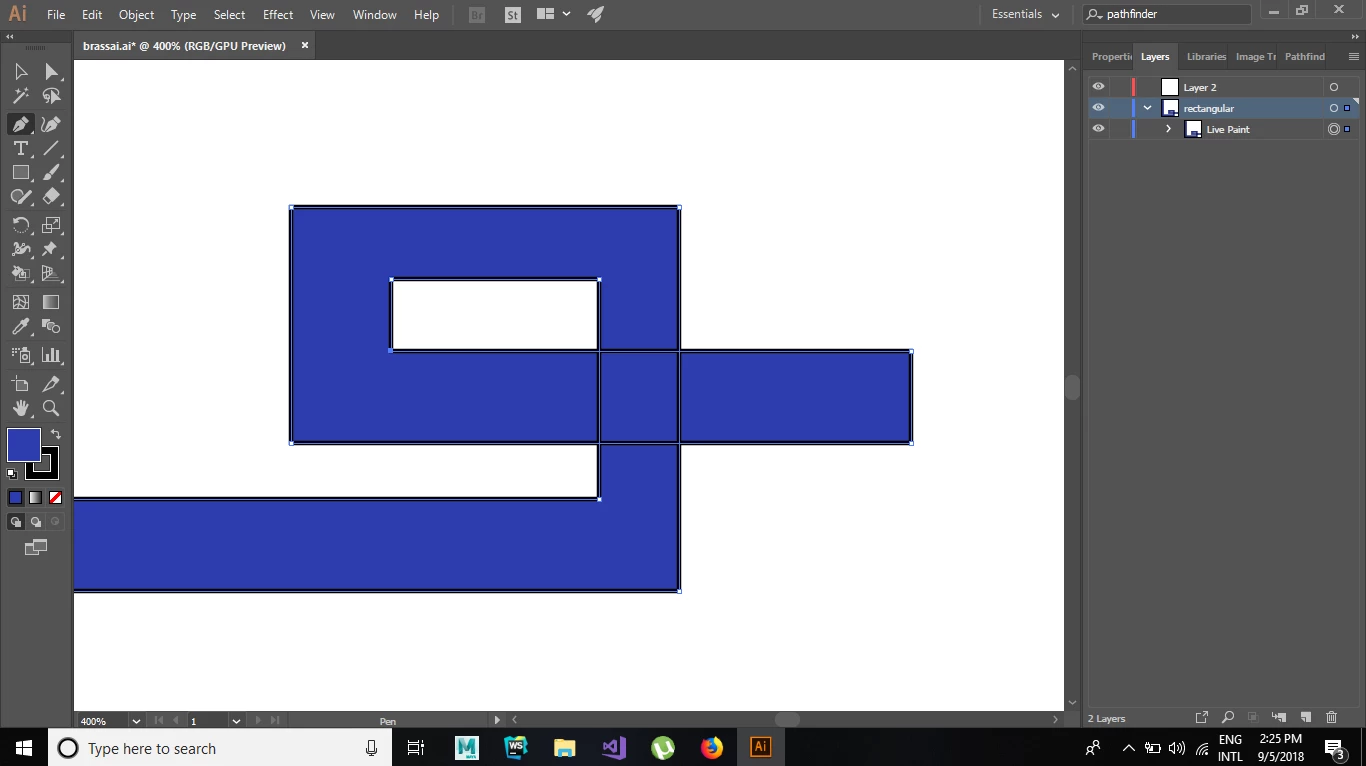
Question: How can I remove those four black lines without compromising anything else ?

What I tried: Deleteing the lines and then rejoining the paths ( rejoining throws errors).

                    Using the shape builder tool. (just shows a black crossed circle instead of the tool)

This topic has been closed for replies.
Correct answer tonyharmer

Hi

This looks like a Live Paint object—use the Live Paint Selection Tool (SHIFT+L to select via the keyboard) then select the strokes and change their colour to None.

2 replies

tonyharmer
Community Expert
Community Expert
September 5, 2018

You're most welcome and sometimes the solutions are simple, but Illustrator is a big product and you're just starting out, so no worries (plus it's what we are here for).

Participant
November 28, 2021

It is not working!

tonyharmer
Community Expert
tonyharmerCommunity ExpertCorrect answer
Community Expert
September 5, 2018

Hi

This looks like a Live Paint object—use the Live Paint Selection Tool (SHIFT+L to select via the keyboard) then select the strokes and change their colour to None.

loris55283829
Participant
September 5, 2018

That was embarassingly simple. Thanks