HailEsteb
Participant
September 14, 2026
Question

how to disable "discover" pop-ups

  • September 14, 2026
  • 1 reply
  • 16 views

Can someone please tell me how to disable these “discover” pop ups that keep showing up in the top right hand side of my illustrator panel?  they get in the way of my work, usually are just advertising adobes firefly features, or trying to take over my work. (no, i don't want you to generate my vectors for me. I’m learning vectors don't take my learning away from me). please help. ive spent a significant amount of time trying to get rid of the pop ups and this one i cant figure out. 

 

    1 reply

    Nataliia_M
    Inspiring
    September 15, 2026

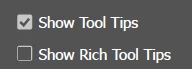
    Hi ​@HailEsteb I guess disabling Rich Tool Tips in the settings can help a bit

    Windows:
    Edit → Preferences → General → uncheck "Show Rich Tool Tips"
    Mac:
    Illustrator → Preferences → General → uncheck "Show Rich Tool Tips"


    But not all of those pop-ups will disappear. You can also vote on the Uservoice report here: https://illustrator.uservoice.com/forums/333657-illustrator-desktop-feature-requests/suggestions/47351396-i-want-to-control-how-many-pop-ups-i-see

    Warmly, Nataliia