

MahaB82A
March 9, 2026
Answered

How-To dismiss blue dot on the Pencil tool in Illustrator

  • March 9, 2026
  • 3 replies
  • 93 views

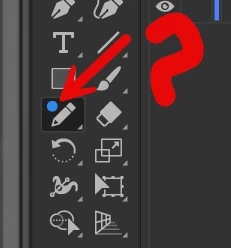
What is the reason of having a Blue Color Tiny Circle above the Pencil Tool?


    Correct answer Ton Frederiks

    It is there to attract attention for new feautures. It disappears when you start using the pencil tool.

    3 replies

    Ton Frederiks
    Community Expert
    Ton FrederiksCommunity ExpertCorrect answer
    Community Expert
    March 9, 2026

    It is there to attract attention for new feautures. It disappears when you start using the pencil tool.

    Ares Hovhannesyan
    Community Expert
    Community Expert
    March 9, 2026

    That indicate a new feature for pencil Tool.


    Tina_Irvine
    Community Expert
    Community Expert
    March 9, 2026

    Hi ​@MahaB82A,

    I don’t see the blue dot on my screen (I’m on the latest version of Illustrator), but it appears to be an indicator that it’s going to close a path. You can double-click on the pencil tool to open the options and try changing settings.

    MahaB82A
    MahaB82AAuthor
    March 9, 2026

    Thanks for the help.

