



ASilva
Inspiring
May 22, 2020 10:42 PM UTC
Answered

How to divide paths in Illustrator?

Hi there ... ive been trying to create a image/brand for my self with my initials and so far i came up with this, below.
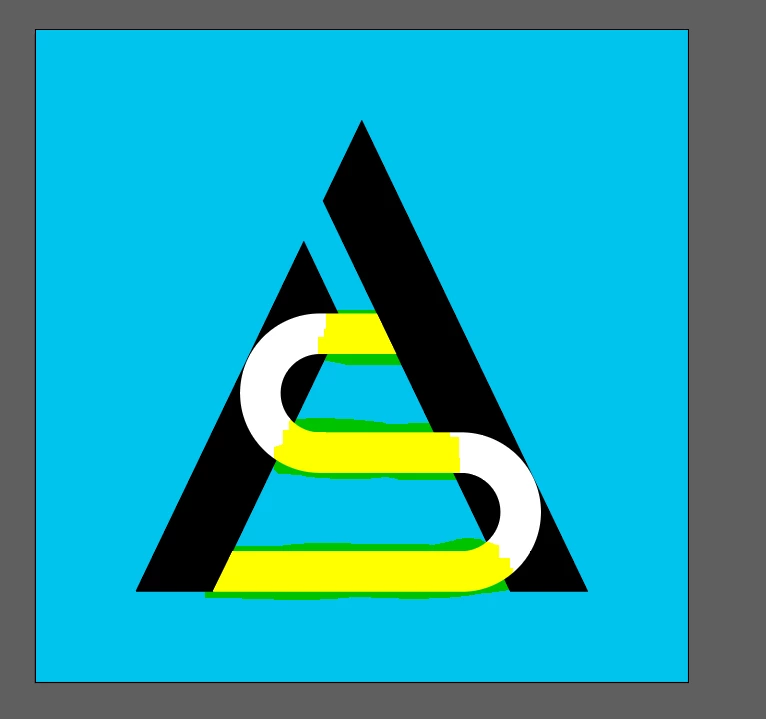


And the thing is, i want to be able to put the yelow highlithed section with black color but im not being able to do that, can someone help me or give me a tip on hoow to do it ??


Thanks

ASilva


{Renamed by MOD}

This topic is closed to new replies. Start a new post to keep the conversation going.
Ton Frederiks
Ton FrederiksCorrect answer
Community Expert
May 22, 2020 11:08 PM UTC

You can try to select the black and white parts, make sure that they are outlined objects (outline strokes if not).

In the Pathfinder panel click the lower left > Divide.

Use the Direct selection tool to select the parts that you want to fill with black.

3 replies

Ton Frederiks
Community Expert
Ton FrederiksCommunity ExpertCorrect answer
Community Expert
May 22, 2020 11:08 PM UTC

You can try to select the black and white parts, make sure that they are outlined objects (outline strokes if not).

In the Pathfinder panel click the lower left > Divide.

Use the Direct selection tool to select the parts that you want to fill with black.

Translate
ASilva
ASilvaAuthor
Inspiring
May 23, 2020 4:04 PM UTC

Thanks a lot, i had to post here because some people were teling me to use pathfinder trim option and it was not doing anything, anything thanks a lot, i just need to see what looks better 🙂


from these 2 🙂


Any way ... thanks 🙂

Translate
Ton Frederiks
Community Expert
Community Expert
May 23, 2020 4:56 PM UTC

Good to hear that helped.

Translate