cynthiadevoos
Participant
July 31, 2017
Answered

How to drastically reduce SVG file size?

  • July 31, 2017
  • 3 replies
  • 78757 views

Hi all,

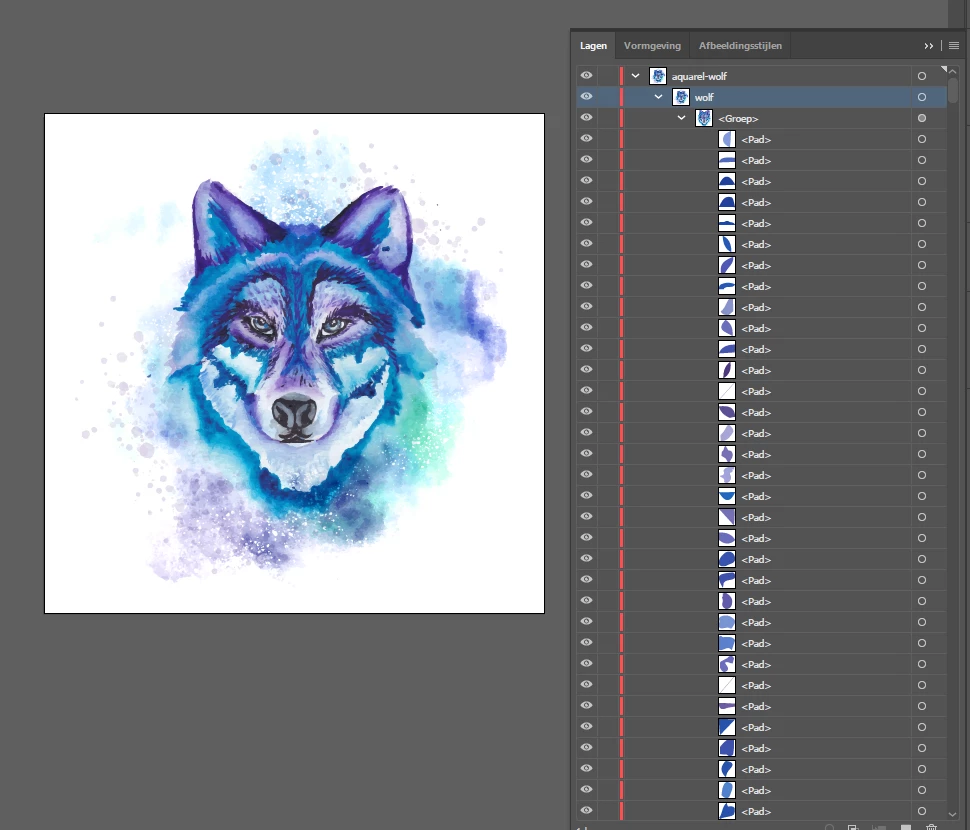
I have an amazing aquarel wolf and I need to save it as SVG but the file size is 16MB. How to I make it like 3 mb or even smaller. Is there some kind of converter? Do I need to edit the SVG code? There are a lot of layers in it.

Thank you in advance!

This topic has been closed for replies.
Correct answer Jongware

Can you say why you need to save this image as SVG?

As it is a near-photographic image, it is not really suitable to save as vector. Illustrator's native format may work just fine (for such an image, I imagine it's barely smaller though), but SVG is way more verbose. Imagine you have an actual high-resolution photo and want to save that as an SVG; at that point, each individual pixel would need saving as a very tiny colored square with four coordinates.

Did you check if there is nothing out of the ordinary in the SVG Options dialog? Also, would it be alright to save it as a compressed SVG as well?

The only other option (unless you must save it as a vector image) is saving it as a JPEG (or any other bitmap format, for that matter), which ought to do wonders here.

3 replies

cynthiadevoos
Participant
August 1, 2017

Thanks guys!

I work for a company that personalises clothing etc. I need to save it as a SVG to put a code (json) on top of it so it can be personalised with a name. See example below. So unfortunately I cant work with a png or jpg. I will try to work with your tips, thank you!

Singlet met naam | Bedrukte baby en kinderkleding met tekst | simply colors

Ton Frederiks
Community Expert
Community Expert
August 1, 2017

It may be worth trying to rasterize the file and save as SVG.

SVG can contain images.

Inspiring
July 31, 2017

As this is a very detailed image, I'm not sure how smaller it can be even if you optimize the SVG but you can try this online tool SVGOMG - SVGO's Missing GUI . I'd be surprised if you go below 3MB though.

Another suggestion to improve the file size for SVGs is to get rid of all redundant anchor points. Bu with this drawing I wouldn't even try that as it's very detailed.

Your best option in my opinion is to save it as a PNG file to make sure you have a small file size and no image quality loss.

Jongware
Community Expert
JongwareCommunity ExpertCorrect answer
Community Expert
July 31, 2017

Can you say why you need to save this image as SVG?

As it is a near-photographic image, it is not really suitable to save as vector. Illustrator's native format may work just fine (for such an image, I imagine it's barely smaller though), but SVG is way more verbose. Imagine you have an actual high-resolution photo and want to save that as an SVG; at that point, each individual pixel would need saving as a very tiny colored square with four coordinates.

Did you check if there is nothing out of the ordinary in the SVG Options dialog? Also, would it be alright to save it as a compressed SVG as well?

The only other option (unless you must save it as a vector image) is saving it as a JPEG (or any other bitmap format, for that matter), which ought to do wonders here.