
Participating Frequently
February 10, 2010
Answered

How to draw a Normal (bell-shaped) distribution curve?

  • February 10, 2010
  • 2 replies
  • 50094 views

I did a search for this and nothing came up, so apologies if it's been asked before.

How does one draw the bell-shaped or Normal distribution curve used that's widely in statistics?

Tony
    Correct answer Scott Falkner

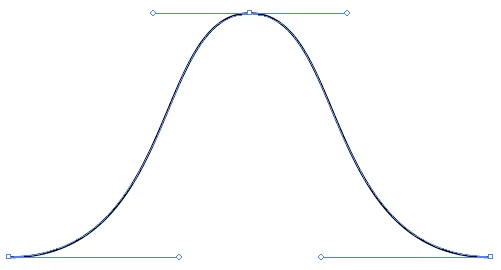
    Three curve points with the pen tool should do it. To draw a curve point, click-and-drag then release. Repeat and the next point will be joined to the first. Repeat again for the third point.

    2 replies

    New Participant
    November 19, 2023

    Another method is to use the Line Tool and then Effects|ZigZag Tool.

    Now use the Rotate option to invert the shape.

    Known Participant
    February 10, 2010

    and it needs to be mathematically accurate?

    -JM

    akilleenAuthor
    Participating Frequently
    February 10, 2010

    No, it doesn't need to be mathematically dead-on accurate. Just a vector graphic that looks like a bell curve for teaching purposes.

    Tony

    Known Participant
    February 10, 2010

    I would just draw half of it with the pen tool and mirror for the other half, so it is perfectly symmetrical. Then you could join (smooth) the two topmost points to form the apex. See my attached example.

    -JM