
Known Participant
May 24, 2020
Answered

How to draw inside a shape in Illustrator?
  • May 24, 2020
  • 1 reply
  • 10580 views

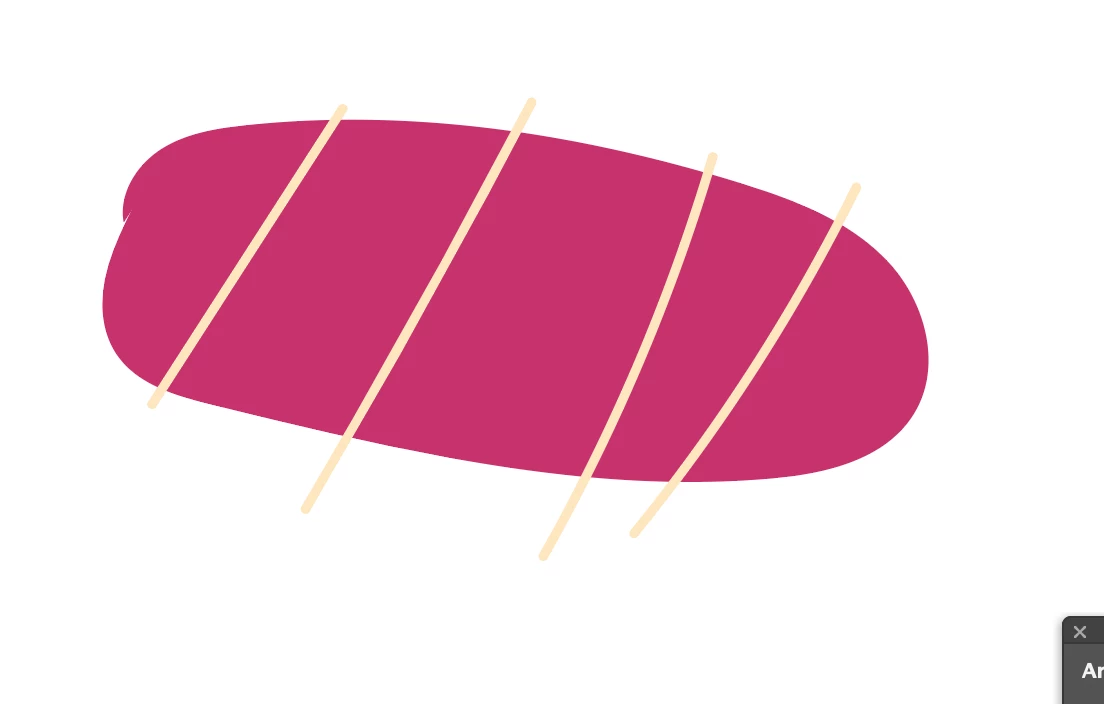
I am wondering how I can make the tan coloured lines be within the pink blob. I want the pink blob to be my primary shape, and the lines just to be decorative, within the shape, not sticking out as in the picture (it's tuna sashimi, if you were wondering). I want the pink blob to make a clean cut of all the tan lines.


I've tried using the "Minus Back" function in the "Pathfinder" tool but it hasn't worked for what I want to do. I've tried applying "Minus Back" to when the lines are arranged both in front and also behind the blob. "Minus front" does not show up as an option in my Pathfinder menu. Thanks for the help, in advance. 🙂 Have a good day!


{Renamed by MOD}

Correct answer jane-e

Hi

  1. Select the pink shape
  2. Set the drawing mode to "Draw Inside
  3. Select the four tan lines
  4. Edit > Cut
  5. Edit > Paste

This will put the line inside the shape and make a clipping path. Double-click to get into isolation mode if you need to make edits.

https://helpx.adobe.com/illustrator/how-to/draw-content-behind-and-inside.html


~ Jane

1 reply

jane-e
Community Expert
jane-eCommunity ExpertCorrect answer
Community Expert
May 25, 2020

Hi

  1. Select the pink shape
  2. Set the drawing mode to "Draw Inside
  3. Select the four tan lines
  4. Edit > Cut
  5. Edit > Paste

This will put the line inside the shape and make a clipping path. Double-click to get into isolation mode if you need to make edits.

https://helpx.adobe.com/illustrator/how-to/draw-content-behind-and-inside.html


~ Jane

Known Participant
May 25, 2020

That worked! Thank you so much!

jane-e
Community Expert
Community Expert
May 25, 2020

You're welcome, LindenTree, I'm glad it's working for you. 😊

~ Jane