dublove
Legend
May 18, 2026
Answered

How to enable the "Auto Resize" function under the preferences and "Regional Text Options"?

  • May 18, 2026
  • 42 replies
  • 3670 views

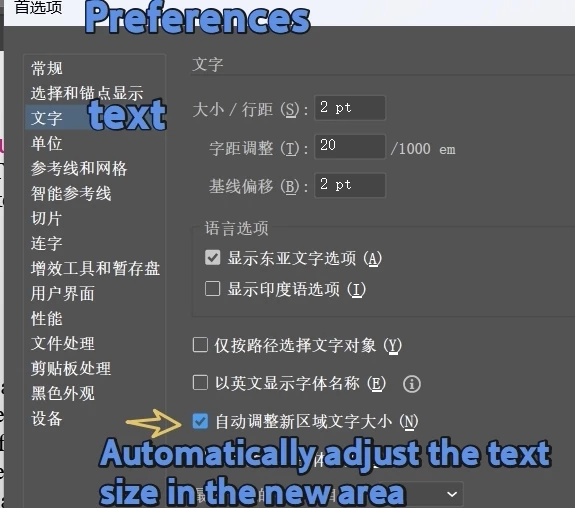
I want to activate two functions of text:
One is:
Preferences>Text>Automatically adjust the text size in the new area“


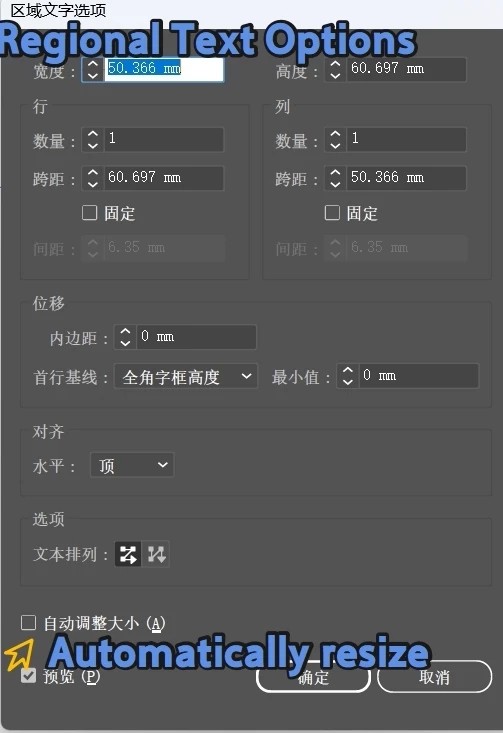
The second one is the menu:

"Text>>Regional Text Options>Auto Resize“


I have searched a lot of information but have not been successful, and it seems that I can only open the preferences option.
A single text object cannot be set, which is a bit unscientific.

function setAutoTextFrames() {
//var autoSize = app.preferences.getBooleanPreference("text/autoSizing");
//app.preferences.setBooleanPreference("text/autoSizing", true);

var autoSize = app.preferences.getStringPreference('text/autoSizing');
alert(autoSize);

}
setAutoTextFrames();

https://judicious-night-bca.notion.site/app-getIntegerPreference-e4088e6caef64b3ba5b801d86fba7877


    This topic is closed to new replies. Start a new post to keep the conversation going.
    Correct answer m1b

    @dublove The best I could do is to use Action code. Unfortunately, it is a bit of a hack, but I cannot think of any other way.

    — Mark

    /**
    * @file Auto Size Selected TextFrame.js
    *
    * Invoke the "Auto Size" area text option on the selected text frame(s).
    *
    * @author m1b
    * @version 2026-05-19
    * @discussion https://community.adobe.com/questions-652/how-to-enable-the-auto-resize-function-under-the-preferences-and-regional-text-options-1623882
    */
    (function () {

    if (
    0 === app.documents.length
    || 0 === app.activeDocument.selection.length
    )
    return alert('Please select one or more text frames and try again.');

    const KEEP_AUTOSIZE_ON = false;
    autoSizeSelectedTextFrames(KEEP_AUTOSIZE_ON);

    })();

    /**
    * Auto-sizes the given `textFrames`.
    * @param {Boolean} [keepOn] - whether to leave Auto Size turned ON (default: true).
    */
    function autoSizeSelectedTextFrames(keepOn) {

    // this is the .aia markup to invoke "Auto Size" in Area Text Options
    const AUTOSIZE_AREATEXT_OPTIONS_AIA_AND_KEEP_ON = '/version 3 /name [ 4 54656d70 ] /isOpen 1 /actionCount 1 /action-1 { /name [ 8 416374696f6e2031 ] /keyIndex 0 /colorIndex 0 /isOpen 0 /eventCount 1 /event-1 { /useRulersIn1stQuadrant 0 /internalName (adobe_SLOAreaTextDialog) /localizedName [ 17 417265612054797065204f7074696f6e73 ] /isOpen 0 /isOn 1 /hasDialog 0 /parameterCount 1 /parameter-1 { /key 1952539754 /showInPalette 4294967295 /type (integer) /value 1 } } }';
    const AUTOSIZE_AREATEXT_OPTIONS_AIA_AND_KEEP_OFF = '/version 3 /name [ 4 54656d70 ] /isOpen 1 /actionCount 1 /action-1 { /name [ 8 416374696f6e2031 ] /keyIndex 0 /colorIndex 0 /isOpen 0 /eventCount 2 /event-1 { /useRulersIn1stQuadrant 0 /internalName (adobe_SLOAreaTextDialog) /localizedName [ 17 417265612054797065204f7074696f6e73 ] /isOpen 0 /isOn 1 /hasDialog 0 /parameterCount 1 /parameter-1 { /key 1952539754 /showInPalette 4294967295 /type (integer) /value 1 } } /event-2 { /useRulersIn1stQuadrant 0 /internalName (adobe_SLOAreaTextDialog) /localizedName [ 17 417265612054797065204f7074696f6e73 ] /isOpen 0 /isOn 1 /hasDialog 0 /parameterCount 1 /parameter-1 { /key 1952539754 /showInPalette 4294967295 /type (integer) /value 2 } } }';

    var aia = keepOn
    ? AUTOSIZE_AREATEXT_OPTIONS_AIA_AND_KEEP_ON
    : AUTOSIZE_AREATEXT_OPTIONS_AIA_AND_KEEP_OFF;

    // invoke the auto-size
    doActionFromString(aia);

    };

    /**
    * Create and execute an action using the markup supplied.
    *
    * Loads the .aia into a "DeleteMeNNNNN" action set,
    * which will be unloaded after running.
    *
    * Example of .aia markup:
    * const AUTOSIZE_AREATEXT = '/version 3 /name [ 4 54656d70 ] /isOpen 1 /actionCount 1 /action-1 { /name [ 8 416374696f6e2031 ] /keyIndex 0 /colorIndex 0 /isOpen 0 /eventCount 1 /event-1 { /useRulersIn1stQuadrant 0 /internalName (adobe_SLOAreaTextDialog) /localizedName [ 17 417265612054797065204f7074696f6e73 ] /isOpen 0 /isOn 1 /hasDialog 0 /parameterCount 1 /parameter-1 { /key 1952539754 /showInPalette 4294967295 /type (integer) /value 1 } } }';
    *
    * @author m1b (and thanks to Charu Rajput for initial idea of loading a temporary aia).
    * @version 2026-05-19
    * @param {String} aia - the action markup.
    */
    function doActionFromString(aia) {

    // replace the set name with a unique throwaway name to avoid collisions
    var setNameHex = encodeHex('DeleteMe' + Math.floor(Math.random() * 99999 + 1));
    aia = aia.replace(/\/name \[ [0-9]+ [0-9a-f]+ \]/, '/name [ ' + (setNameHex.length / 2) + ' ' + setNameHex + ' ]');

    var findName = /\/name\s\[ [0-9]+ ([0-9a-f]+) \]/g;
    var setName = decodeHex(findName.exec(aia)[1]);
    var actionName = decodeHex(findName.exec(aia)[1]);

    try {

    // save temp action, load it, do it, unload it, delete it
    var tmp = File(Folder.temp + '/' + setName + '.aia');
    tmp.open('w');
    tmp.write(aia);
    tmp.close();
    app.loadAction(tmp);
    app.doScript(actionName, setName, false);

    }
    catch (error) {
    alert('Script failed: ' + error.message);
    }
    finally {
    app.unloadAction(setName, '');
    tmp.remove();
    }

    };

    /**
    * Returns an ASCII string, given hexadecimal number.
    * @param {String} hex - the hexadecimal to decode.
    * @returns {String} - the decoded string.
    */
    function decodeHex(hex) {

    var result = '';

    for (var i = 0; i < hex.length; i += 2)
    result += String.fromCharCode(parseInt(hex.substr(i, 2), 16));

    return result;

    };

    /**
    * Returns a hexadecimal string encoding of an ASCII string.
    * @param {String} str - the string to encode.
    * @returns {String} - the hex-encoded string.
    */
    function encodeHex(str) {

    var result = '';

    for (var i = 0; i < str.length; i++) {
    var code = str.charCodeAt(i).toString(16);
    result += (code.length < 2 ? '0' : '') + code;
    }

    return result;

    };

    Edit 2026-05-19: added better error handling and documentation. 

    42 replies

    dublove
    dubloveAuthor
    Legend
    May 18, 2026

    Hi ​@m1b 

    Look at this, I happened to reply to myself before you.


    This front-end code can enable the preference "automatically adjust the size of the text box in the new area".


    But the following code cannot enable automatic resizing of individual text boxes.
    I don't know why it needs to be converted into dotted text.
    And it may accidentally delete overflow text.


    Strange Illustrator architecture, is it so complicated to turn on a switch?

    //app.preferences.setBooleanPreference("text/autoSizing",!app.preferences.getBooleanPreference("text/autoSizing"));
    app.preferences.setBooleanPreference("text/autoSizing", true);
    function setAutoTextFrames() {
    var autoSize = app.preferences.getBooleanPreference("text/autoSizing");
    app.preferences.setBooleanPreference("text/autoSizing", true);
    var doc = app.activeDocument;
    var items = doc.selection;
    var content;
    for (var i = items.length - 1; i > -1; i--) {
    if (items[i].kind == TextType.AREATEXT) {
    content = items[i].contents;
    items[i].contents = "This is just a random string of text to keep the width of the text frame stable while we convert to point text then back to area text";
    items[i].convertAreaObjectToPointObject();
    items[i].convertPointObjectToAreaObject();
    items[i].contents = content;
    }
    }
    app.preferences.setBooleanPreference("text/autoSizing", autoSize);
    }
    setAutoTextFrames();


    m1b
    Community Expert
    m1bCommunity ExpertCorrect answer
    Community Expert
    May 18, 2026

    @dublove The best I could do is to use Action code. Unfortunately, it is a bit of a hack, but I cannot think of any other way.

    — Mark

    /**
    * @file Auto Size Selected TextFrame.js
    *
    * Invoke the "Auto Size" area text option on the selected text frame(s).
    *
    * @author m1b
    * @version 2026-05-19
    * @discussion https://community.adobe.com/questions-652/how-to-enable-the-auto-resize-function-under-the-preferences-and-regional-text-options-1623882
    */
    (function () {

    if (
    0 === app.documents.length
    || 0 === app.activeDocument.selection.length
    )
    return alert('Please select one or more text frames and try again.');

    const KEEP_AUTOSIZE_ON = false;
    autoSizeSelectedTextFrames(KEEP_AUTOSIZE_ON);

    })();

    /**
    * Auto-sizes the given `textFrames`.
    * @param {Boolean} [keepOn] - whether to leave Auto Size turned ON (default: true).
    */
    function autoSizeSelectedTextFrames(keepOn) {

    // this is the .aia markup to invoke "Auto Size" in Area Text Options
    const AUTOSIZE_AREATEXT_OPTIONS_AIA_AND_KEEP_ON = '/version 3 /name [ 4 54656d70 ] /isOpen 1 /actionCount 1 /action-1 { /name [ 8 416374696f6e2031 ] /keyIndex 0 /colorIndex 0 /isOpen 0 /eventCount 1 /event-1 { /useRulersIn1stQuadrant 0 /internalName (adobe_SLOAreaTextDialog) /localizedName [ 17 417265612054797065204f7074696f6e73 ] /isOpen 0 /isOn 1 /hasDialog 0 /parameterCount 1 /parameter-1 { /key 1952539754 /showInPalette 4294967295 /type (integer) /value 1 } } }';
    const AUTOSIZE_AREATEXT_OPTIONS_AIA_AND_KEEP_OFF = '/version 3 /name [ 4 54656d70 ] /isOpen 1 /actionCount 1 /action-1 { /name [ 8 416374696f6e2031 ] /keyIndex 0 /colorIndex 0 /isOpen 0 /eventCount 2 /event-1 { /useRulersIn1stQuadrant 0 /internalName (adobe_SLOAreaTextDialog) /localizedName [ 17 417265612054797065204f7074696f6e73 ] /isOpen 0 /isOn 1 /hasDialog 0 /parameterCount 1 /parameter-1 { /key 1952539754 /showInPalette 4294967295 /type (integer) /value 1 } } /event-2 { /useRulersIn1stQuadrant 0 /internalName (adobe_SLOAreaTextDialog) /localizedName [ 17 417265612054797065204f7074696f6e73 ] /isOpen 0 /isOn 1 /hasDialog 0 /parameterCount 1 /parameter-1 { /key 1952539754 /showInPalette 4294967295 /type (integer) /value 2 } } }';

    var aia = keepOn
    ? AUTOSIZE_AREATEXT_OPTIONS_AIA_AND_KEEP_ON
    : AUTOSIZE_AREATEXT_OPTIONS_AIA_AND_KEEP_OFF;

    // invoke the auto-size
    doActionFromString(aia);

    };

    /**
    * Create and execute an action using the markup supplied.
    *
    * Loads the .aia into a "DeleteMeNNNNN" action set,
    * which will be unloaded after running.
    *
    * Example of .aia markup:
    * const AUTOSIZE_AREATEXT = '/version 3 /name [ 4 54656d70 ] /isOpen 1 /actionCount 1 /action-1 { /name [ 8 416374696f6e2031 ] /keyIndex 0 /colorIndex 0 /isOpen 0 /eventCount 1 /event-1 { /useRulersIn1stQuadrant 0 /internalName (adobe_SLOAreaTextDialog) /localizedName [ 17 417265612054797065204f7074696f6e73 ] /isOpen 0 /isOn 1 /hasDialog 0 /parameterCount 1 /parameter-1 { /key 1952539754 /showInPalette 4294967295 /type (integer) /value 1 } } }';
    *
    * @author m1b (and thanks to Charu Rajput for initial idea of loading a temporary aia).
    * @version 2026-05-19
    * @param {String} aia - the action markup.
    */
    function doActionFromString(aia) {

    // replace the set name with a unique throwaway name to avoid collisions
    var setNameHex = encodeHex('DeleteMe' + Math.floor(Math.random() * 99999 + 1));
    aia = aia.replace(/\/name \[ [0-9]+ [0-9a-f]+ \]/, '/name [ ' + (setNameHex.length / 2) + ' ' + setNameHex + ' ]');

    var findName = /\/name\s\[ [0-9]+ ([0-9a-f]+) \]/g;
    var setName = decodeHex(findName.exec(aia)[1]);
    var actionName = decodeHex(findName.exec(aia)[1]);

    try {

    // save temp action, load it, do it, unload it, delete it
    var tmp = File(Folder.temp + '/' + setName + '.aia');
    tmp.open('w');
    tmp.write(aia);
    tmp.close();
    app.loadAction(tmp);
    app.doScript(actionName, setName, false);

    }
    catch (error) {
    alert('Script failed: ' + error.message);
    }
    finally {
    app.unloadAction(setName, '');
    tmp.remove();
    }

    };

    /**
    * Returns an ASCII string, given hexadecimal number.
    * @param {String} hex - the hexadecimal to decode.
    * @returns {String} - the decoded string.
    */
    function decodeHex(hex) {

    var result = '';

    for (var i = 0; i < hex.length; i += 2)
    result += String.fromCharCode(parseInt(hex.substr(i, 2), 16));

    return result;

    };

    /**
    * Returns a hexadecimal string encoding of an ASCII string.
    * @param {String} str - the string to encode.
    * @returns {String} - the hex-encoded string.
    */
    function encodeHex(str) {

    var result = '';

    for (var i = 0; i < str.length; i++) {
    var code = str.charCodeAt(i).toString(16);
    result += (code.length < 2 ? '0' : '') + code;
    }

    return result;

    };

    Edit 2026-05-19: added better error handling and documentation. 

    dublove
    dubloveAuthor
    Legend
    May 18, 2026

    @m1b 

    Your code still hasn't enabled the 'auto resize' option.

    Just turn on this switch.
    Using the system's built-in text conversion is even more secure.
    A shortcut key can switch back and forth


    Preferences can be opened using this:
    app.preferences.setBooleanPreference("text/autoSizing", true);