

How to evenly place objects along a path?
I want to place objects evenly along a path. I have six objects and I want them spaced evenly along a path that is a circle. What is the easiest/quickest way to do this?
I have tried using the Blend technique along with "replacing spine" for the circle path but my result is not spaced evenly along the path.
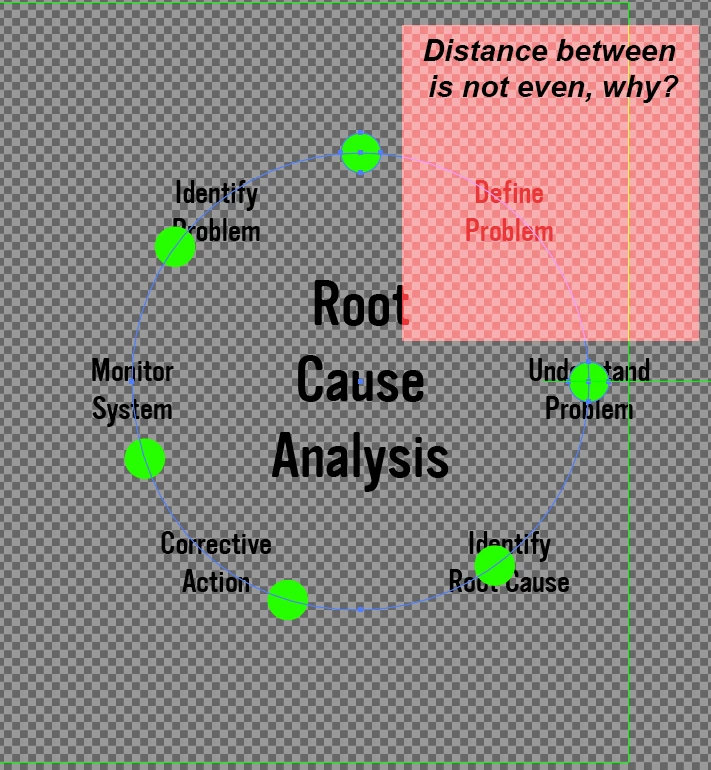
Here are the steps I took:
Ultimately I want the text to replace the circles but I was using the circles to derive placement and then I was just going to manually place the text objects where the circles were once I had even distribution along my path.
1. I created the circle path.
2. I created the 2 circle graphics which I am going to use the blend operation on. (these objects were placed an arbitrary distance away from one another).
3. I open up the blend options and set to, "Specified steps: 4" (so that I will have a total of 6 objects along the path)
4. The Blend is created with a total of 6 circle objects.
5. I then select both objects (the blend and the circle path) and I go to "Blend > Replace Spine"
6. My circle objects are now on the circle path and the placement looks even except for the portion marked in the attached image. This result in unacceptable as I need the placement of objects to be across the entire length of the circle path, not just a portion of it.
Hopefully that makes sense.
Your guidance is appreciated, thanks.
 AdChoices