
How to export 3D object with transparent Layers
First Post in the community here. Having an issue and hoping someone has experinced this or knows a workaround.
I am creating 3d objects with transparncy. In this instance we are dealing with a water drop. I'd like to put this on a website with the same attributes. If I move the object over a background in illustrator the object is transparent and works perfect and I can see the background behind it. I just realized that the background isn't truly transparent when removed off of an artboard. I've been using illustrator for years and I am not sure how I am just realizing this. (See attached image)
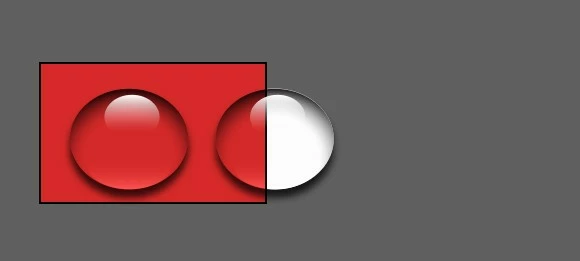
I found that this was an issue when I went to export for a web deisgn project and the image had a white background.
Is exporting an object with partial transparent properties possible??
Thanks for any help anyone can provide.


 AdChoices