Participating Frequently
Oct 1, 2024 8:49 AM UTC
Answered

How-To: Export from ai to pdf single drawing boards

Hello, I have a problem, I have 25 drawing boards in illustrator and the file is saved as .ai, I want to export to single pdf for each drawing board, I've done it with export for screens, but the problem is that when I open the created pdf again into illustrator I see again all the 25 drawing boards and not the one that I exported in this pdf, it's very annoying, then I have to delete the drawing boards that I don't need. Anyone has a solution? Thank you!

Ton Frederiks
Ton FrederiksCorrect answer
Community Expert
Jan 15, 2025 9:31 AM UTC

But if i export PDF without Illustrator editing capabilities after that all fonts are missing. Please check refrence in Previous post


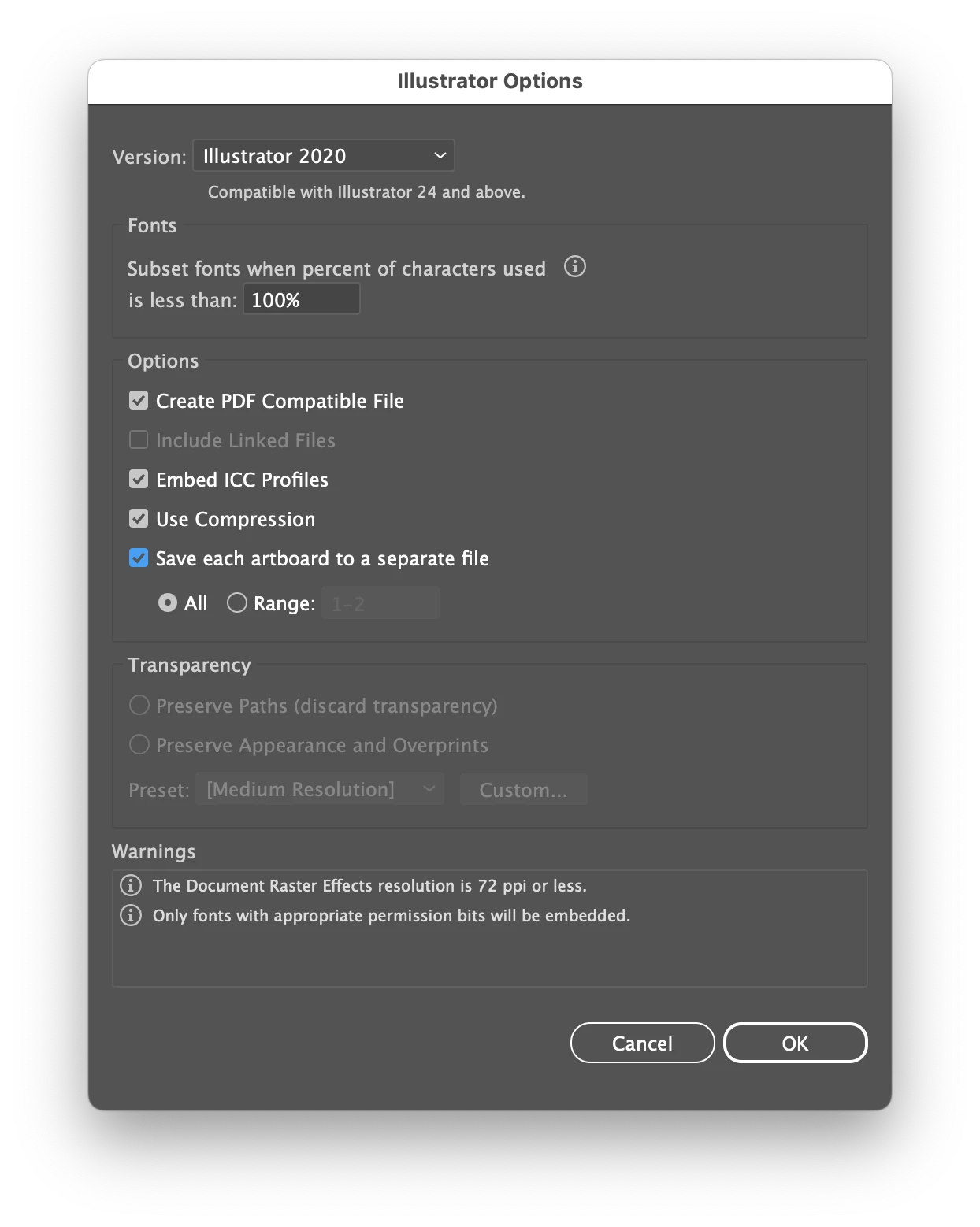
If you want to edit single artboards, just check the "Save each artboard to a separate file" option when saving as .ai.


12 replies

Ton Frederiks
Community Expert
Community Expert
Oct 3, 2024 5:23 PM UTC

Good to hear that helped

Translate
Ton Frederiks
Community Expert
Community Expert
Oct 1, 2024 9:23 AM UTC

And always use the original Illustrator file to edit. PDF is a final delivery format.

If you want to have separate Illustrator files, use the "Save each artboard to a separate file" checkbox in the Illustrator Options when saving as...

Translate
Participating Frequently
Oct 3, 2024 5:18 PM UTC

a yes, thank you! 

Translate
Ton Frederiks
Community Expert
Community Expert
Oct 1, 2024 9:18 AM UTC

Hi Francesca,

The default PDF export settings will have Illustrator Editing turned on, which means that all artboards will be included in the file, even when they are not visible in Acrobat.

Save your file as .ai to keep a complete editable Illustrator file.

In Illustrator choose Edit > Adobe PDF Presets and create a new preset without Preserve Illustrator Editing Capabilities.

When choosing Export > Export for Screens choose PDF and click the  cog wheel to choose the export settings.

Select PDF, choose the one you created without Preserve Illustrator Editing Capabilities and click Save Settings.

Select the Artboard you want to export and click Export Artboard.

Translate
Participating Frequently
Oct 3, 2024 5:17 PM UTC

Wow, now it goes like I wanted! Thank you very much for your experience here it is really helpful when you have to export many drawing boards! It's really true, you never stop learning in life and that's the best! 🙂

Translate