

How to export to PNG at specific pixel dimensions? (AI 2020)
I need a png file with pixel dimensions 10000x10000 at 300ppi. For performance, I don't create AI documents that big since it's vector anyway. I use 1000x1000, the smallest native size I might need.
What I've been doing is exporting as svg and opening it in PS, which allows me to choose the exact size file I want the svg to be in pixels. I choose 10000 then save as png. Easy.
Taking it into PS works perfectly for me since there are sometimes quick little tweaks I want to add that take 1/100th of the time it would take in AI. But I just discovered svg doesn't fully support layer blend modes, so I want to save as png directly from AI.
File>save as doesn't have png as a choice.
File>export as doesn't let me choose pixel dimensions.
File>export>save for web doesn't let me choose pixel dimensions over 8000.
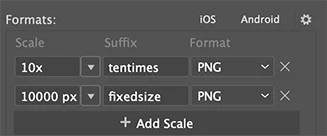
File>export>export for screens lets me choose pixel dimensions and other sizing options but the resulting png file has a ppi of 1051 instead of the original 300 as if it's resampling.
Is there any way to do what I want directly out of AI or is that last option the best I'm going to get and I should just change the ppi in PS and save it again?
Thanks!


 AdChoices