
Jason Dean
Participating Frequently
February 12, 2023
Answered

How To fill A4 Artboard with several of the same size and shape stickers with same spacing?

  • February 12, 2023
  • 3 replies
  • 554 views

I use a A4 artboard everytime when doing this task.


Here is an example:


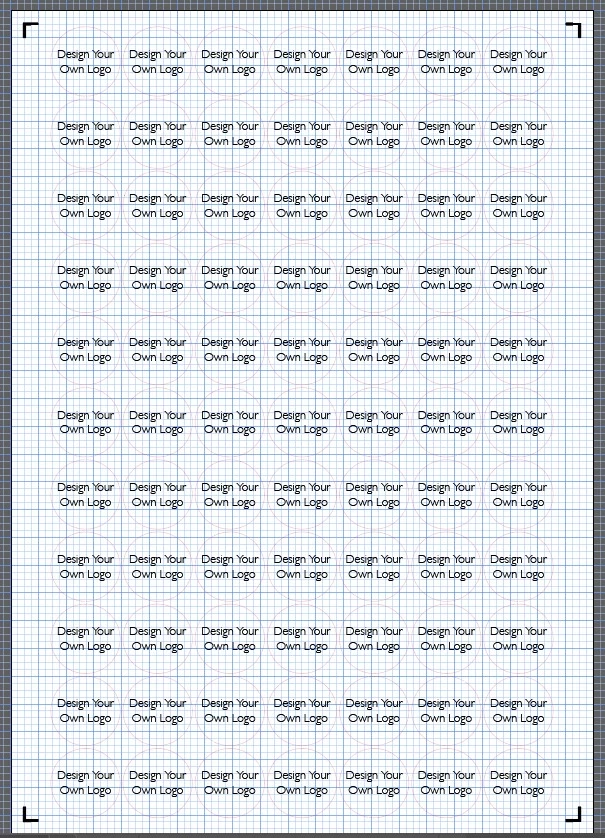
I design a round 25mm circle design ( but this can be any single size per A4 artboard for example  45mm etc but NOT different sizes on the same artboard ) - I then want this 25mm circle design to fill the artboard with lots of 25mm circle stickers. Please see image below to show what I am after. As I do hundereds of designs each day on different artboards on different page tabs I dont have the time to manually fill the page. Is it possible for an auto fill function ?


This topic has been closed for replies.
Correct answer Ton Frederiks

If you have to do this hundreds of times each day, you can save graphic styles with variations of the transform effects.

3 replies

Jason Dean
Participating Frequently
March 1, 2023

Thank you everyone for your help


I will see what I can do with the information you have given me thank you 

Ton Frederiks
Community Expert
Ton FrederiksCommunity ExpertCorrect answer
Community Expert
February 12, 2023

If you have to do this hundreds of times each day, you can save graphic styles with variations of the transform effects.

Monika Gause
Community Expert
Community Expert
February 12, 2023

You can set up the file so it has two transform effects already applied to the layer.

One of them makes the copies to the right

One makes the copies to the bottom.


Target the layer and then :


Targeting: https://youtu.be/jMDpnI5i7M0