
Inspiring
November 18, 2024
Answered

How to find clipped groups without a fill?

  • November 18, 2024
  • 1 reply
  • 380 views

There are two objects on the artboard: a simple rectangle on the left and a clipping group on the right. Inside the clipping group (which is created in the program with the command: Clipping mask -> Make) is a simple rectangle with a stroke.

The clipping mask object has no fill!  Both objects are just selected, it's not a group. 
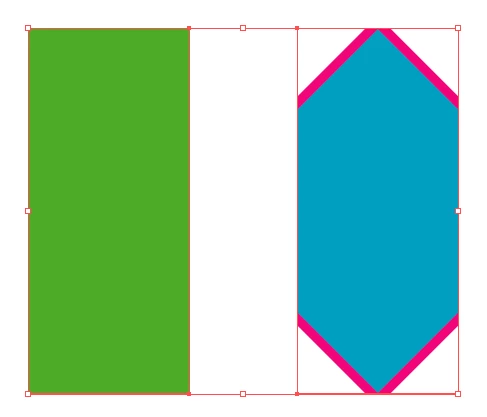
I want to find clipping groups that have no fill, like the one shown on the right.
However, this code finds two objects that fit this condition. Why not just one? 


var arrayNoFill = [];

for (var i = 0; i < newLayer.pageItems.length; i++) {
    var item = newLayer.pageItems[i];
    if (item.typename === "PathItem") {
        continue;
    }
    if (item.typename === "GroupItem" && item.clipped) {
        var clippingMask = null;
        for (var j = 0; j < item.pageItems.length; j++) {
            var subItem = item.pageItems[j];
            if (subItem.clipping) {
                clippingMask = subItem;
            }

            if (clippingMask) {
                var hasFillColor = clippingMask.filled;
                alert("Is filled clipping mask? — " + (hasFillColor ? "Yes." : "No."));
                if (!hasFillColor) {
                    arrayNoFill.push(item);
                }
            }
        }
    }
}

if (arrayNoFill && arrayNoFill.length > 0) {
    alert('arrayNoFill length:' + arrayNoFill.length);
} else {
    alert('arrayNoFill is empty');
}


This topic has been closed for replies.
Correct answer jduncan

So, in your code above, when you find a clipped groupItem you set `var clippingMask = null;` and then you find the first pathItem that is `clipping` so the value of `clippingMask` is no longer `null`. Then when you check the second page item in your clipped grouped, you haven't reset clippingMask to null so your `if (clippingMask)` check still evaluates to true, firing the alert again for the second time. To fix your code, you can simply move the `var clippingMask = null;` line inside of the `for (var j = 0; j < item.pageItems.length; j++)` loop.


You can simplify the code quite a bit like below to get the same result. PLEASE NOTE, there are some wonky edge cases with clipping masks so this may not catch everything single situation.


var newLayer = app.activeDocument.layers[0];
var arrayNoFill = [];

var g, s;
for (var i = 0; i < newLayer.groupItems.length; i++) {
  g = newLayer.groupItems[i];
  if (!g.clipped) continue;
  for (var j = 0; j < g.pageItems.length; j++) {
    s = g.pageItems[j];
    if (s.clipping && !s.filled) {
      arrayNoFill.push(s);
    }
  }
}

alert("Found " + arrayNoFill.length + " unfilled clipping mask(s).");


1 reply

jduncan
Community Expert
jduncanCommunity ExpertCorrect answer
Community Expert
November 18, 2024

So, in your code above, when you find a clipped groupItem you set `var clippingMask = null;` and then you find the first pathItem that is `clipping` so the value of `clippingMask` is no longer `null`. Then when you check the second page item in your clipped grouped, you haven't reset clippingMask to null so your `if (clippingMask)` check still evaluates to true, firing the alert again for the second time. To fix your code, you can simply move the `var clippingMask = null;` line inside of the `for (var j = 0; j < item.pageItems.length; j++)` loop.


You can simplify the code quite a bit like below to get the same result. PLEASE NOTE, there are some wonky edge cases with clipping masks so this may not catch everything single situation.


var newLayer = app.activeDocument.layers[0];
var arrayNoFill = [];

var g, s;
for (var i = 0; i < newLayer.groupItems.length; i++) {
  g = newLayer.groupItems[i];
  if (!g.clipped) continue;
  for (var j = 0; j < g.pageItems.length; j++) {
    s = g.pageItems[j];
    if (s.clipping && !s.filled) {
      arrayNoFill.push(s);
    }
  }
}

alert("Found " + arrayNoFill.length + " unfilled clipping mask(s).");


Inspiring
November 19, 2024

@jduncan "there are some wonky edge cases with clipping masks" I don't doubt it, I've noticed that it's not easy to deal with every possible situation involving clipping masks.