


Answered

m1bCorrect answer
Community Expert
May 17, 2026
Hi
Also look at the `polarity` of the `textPath` to determine if the text is inside (like your green above) or outside.
— Mark
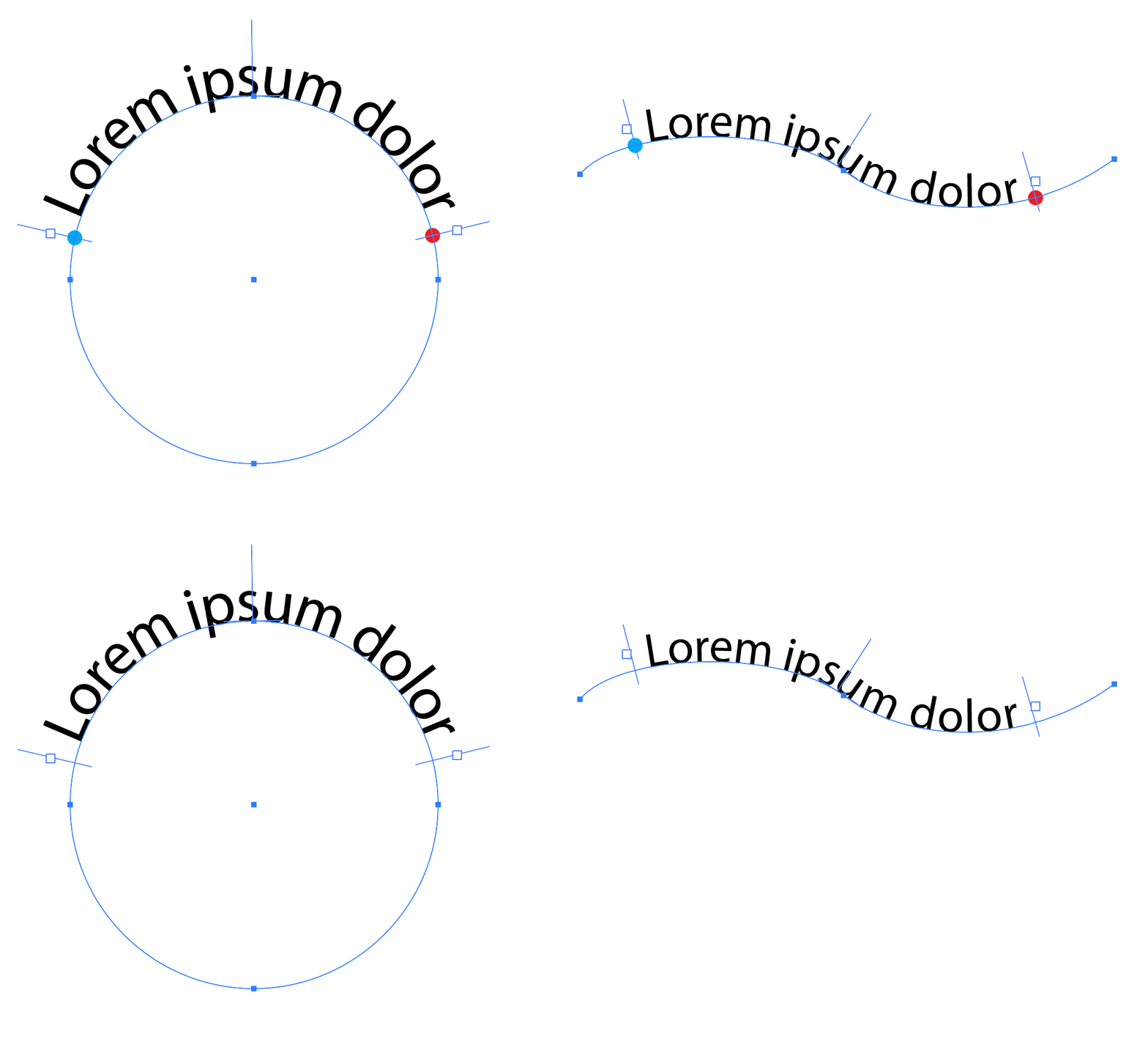
/**
 * @file Get Start And End of Path Text.js
*
 * Demonstration of resolving the T values of a PATHTEXT type TextFrame to points.
 * Note: The "start and end of path text" means the position [x,y] of the path-text specific handles on either side of the path text itself.
 *
 * @author m1b (bezier function by claude code)
 * @version 2026-05-17
 * @discussion https://community.adobe.com/questions-652/how-to-find-start-and-end-positions-in-path-text-using-extendscript-1561754?tid=1561754
 */
(function () {

    var doc = app.activeDocument;
    var item = doc.selection[0];

    if (!item || !item.hasOwnProperty('textPath'))
        return alert('Please select a text on a path object and try again.');

    var pp = item.textPath.pathPoints;

    // get the two points we want
    var startPoint = getPointAtTValue(pp, item.startTValue, item.textPath.closed)
    var endPoint = getPointAtTValue(pp, item.endTValue, item.textPath.closed)

    // draw circles just to show the points
    drawCircle(item.layer, startPoint, 2, { fillColor: (doc.swatches[7] || 0).color });
    drawCircle(item.layer, endPoint, 2, { fillColor: (doc.swatches[4] || 0).color });

    // I think you can use this to work out which side of a circle the text is on (POSITIVE means outside)
    var textIsInsideCircle = (PolarityValues.NEGATIVE === item.textPath.polarity);

})();

/**
 * Returns the document coordinates of a point at a given T value (arc length) along a path.
 * Note: tValues can be arbitrarily large; the segment is determined by `floor(tValue) % segmentCount`.
 * @author m1b
 * @version 2026-05-17
 * @param {PathPoints} pathPoints - Illustrator PathPoints collection.
 * @param {Number} tValue - length from path start, in points.
 * @param {Boolean} [closed] - whether the path is closed. Default: true.
 * @returns {Array} [x, y] document coordinates.
 */
function getPointAtTValue(pathPoints, tValue, closed) {

    closed = (closed !== false);

    var count = pathPoints.length;
    var segmentCount = closed ? count : count - 1;
    var intPart = Math.floor(tValue);
    var segIndex = closed ? intPart % segmentCount : Math.min(intPart, segmentCount - 1);
    var localT = tValue - intPart;
    var curr = pathPoints[segIndex];
    var next = pathPoints[(segIndex + 1) % count];

    return _evaluateCubicBezier(curr.anchor, curr.rightDirection, next.leftDirection, next.anchor, localT);

};

/**
 * Evaluates a cubic Bézier segment at parameter t.
 * @param {Array} p0 - [x, y] start anchor.
 * @param {Array} p1 - [x, y] start right direction.
 * @param {Array} p2 - [x, y] end left direction.
 * @param {Array} p3 - [x, y] end anchor.
 * @param {Number} t - parameter, 0–1.
 * @returns {Array} [x, y] point on curve.
 */
function _evaluateCubicBezier(p0, p1, p2, p3, t) {

    var mt = 1 - t;
    var mt2 = mt * mt;
    var t2 = t * t;
    var a = mt2 * mt;
    var b = 3 * mt2 * t;
    var c = 3 * mt * t2;
    var d = t2 * t;

    return [
        a * p0[0] + b * p1[0] + c * p2[0] + d * p3[0],
        a * p0[1] + b * p1[1] + c * p2[1] + d * p3[1],
    ];

};

/**
 * Draws and returns a circle.
 * @author m1b
 * @version 2025-07-09
 * @param {Document|Layer|GroupItem} container - the container for the circle.
 * @param {Array<Number>|PathPoint} c - center of circle [cx, cy].
 * @param {Number} radius - radius of circle.
 * @param {Object} [props] - object with properties to be applied to the circle.
 * @returns {PathItem}
 */
function drawCircle(container, center, radius, props) {

    if (!container.hasOwnProperty('pathItems'))
        throw Error('drawCircle: bad `container` supplied.');

    if (center.hasOwnProperty('anchor'))
        center = center.anchor;

    var circle = container.pathItems.ellipse(center[1] + radius, center[0] - radius, radius * 2, radius * 2);

    if (props != undefined)
        for (var key in props)
            if (circle.hasOwnProperty(key))
                circle[key] = props[key];

    return circle;

};
 AdChoices