

Participating Frequently
March 26, 2025
Question

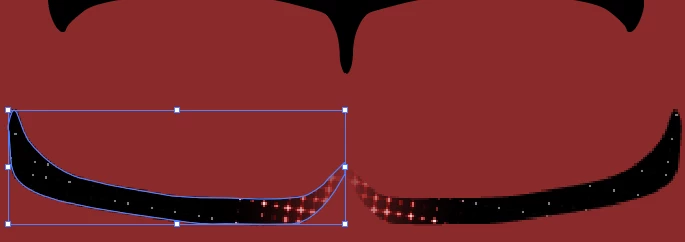
How to fix pixelated halftone?

  • March 26, 2025
  • 1 reply
  • 641 views

Hello,

whenver I try to use halftone on an object it keeps making the selected object very pixelated including the halftone effect. Does anyone know what causes this and how to fix it, please?



1 reply

Anubhav M
Community Manager
Community Manager
March 26, 2025

Hello @Madoras,

This is a raster effect. Could you try changing the resolution under Effects > Document Raster Effects to see if it helps?

Looking forward to hearing from you.


Anubhav

MadorasAuthor
Participating Frequently
March 30, 2025

Hello Anubhav,

I have done that, but the effect still looks very pixelated and not how I want it to look.

This is how it's looking right now, on the left. And on the right is how I would want it to look:


Monika Gause
Community Expert
Community Expert
March 30, 2025

Pure vector halftone can be achieved with plugins inside Illustrator, there's also a script available. All of that (including the script) is not for free.

There is at least one web based generator and the third party software. Inside Illustrator there is the pixel based effect. You need to increase raster effect resolution and also the pixel sizes in the halftone effect.