
Participant
September 27, 2022
Question

how to fix this color changed problem?

  • September 27, 2022
  • 4 replies
  • 570 views

when i  inverted any image to illustrator, the image's color changed. kinda off the color..

Could please anyone help me to fix this problem?

Please check the below image. (image on the rightside is original image)
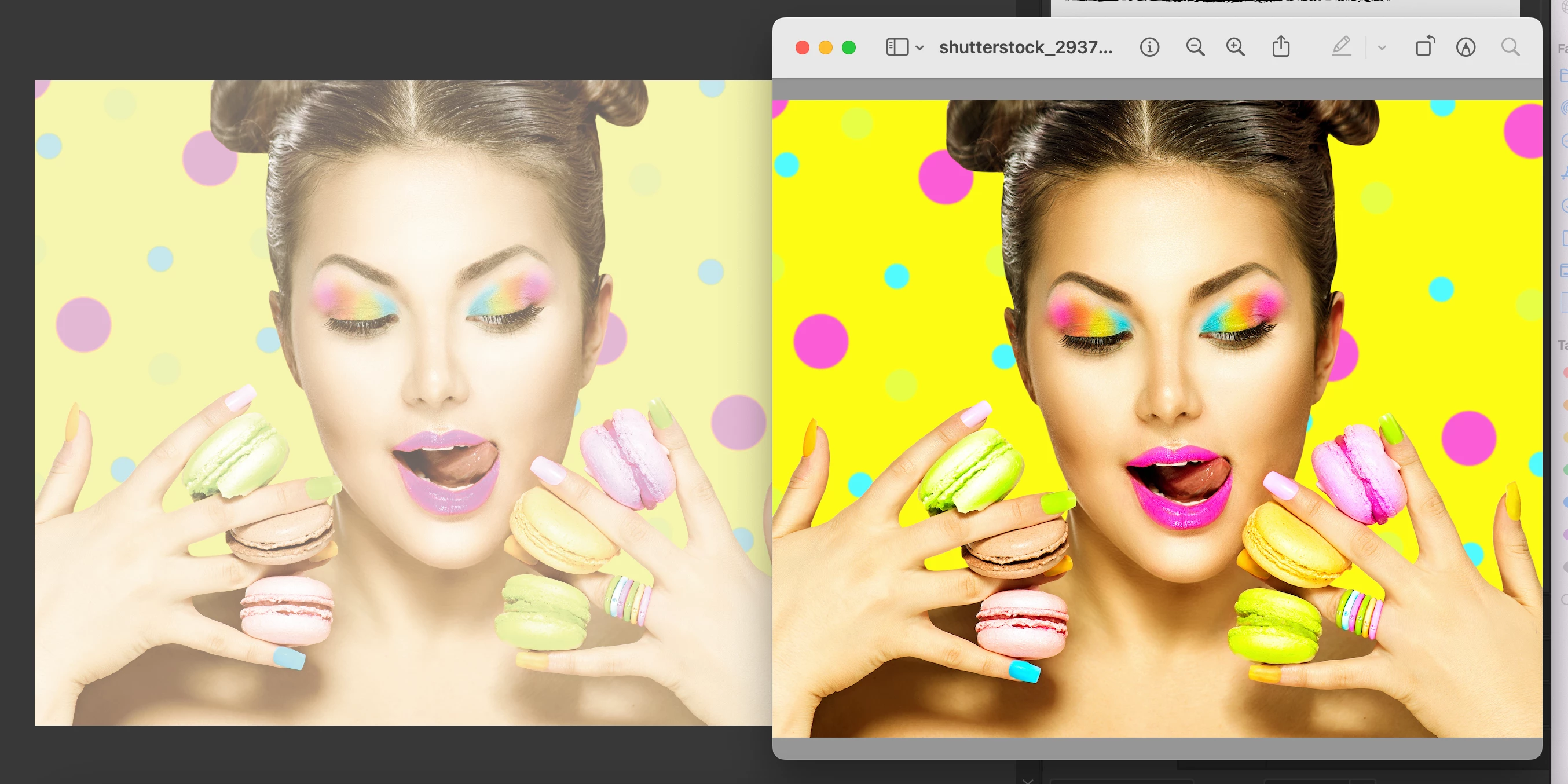
    This topic has been closed for replies.

    4 replies

    Ton Frederiks
    Community Expert
    Community Expert
    September 27, 2022

    What kind of file format is that image, jpeg, png, tiff? What color profile has it?

    Participant
    September 27, 2022

    i setted with CMYK setting and the image format is JPG and PNG


    Monika Gause
    Community Expert
    Community Expert
    September 27, 2022

    The shutterstock image is CMYK?

    Monika Gause
    Community Expert
    Community Expert
    September 27, 2022

    You have opened the image in Preview, right?

    Preview cannot be trusted with anything, above all, color. The "original" image probably is much less bright than Preview shows. It's probably also not as dull as Illustrator imports it.


    Also: please show your color management settings.

    Participant
    September 27, 2022

    I already changed my setting few time from the cummunity recomendation. 😞 it dosen't work...

    but here is my settting right now.

    Monika Gause
    Community Expert
    Community Expert
    September 27, 2022

    You are printing in Japan?

    Please turn on all the Mismatch and missing profiles checkboxes and then import the image again.


    Is any color proof turned on?

    Disposition_Dev
    Legend
    September 27, 2022

    Check your document color settings. Most likely your document is in CMYK mode. CMYK output is necessarily different from RGB output and they have different color gamuts (the array of colors available). So, when your nice beautiful vibrant RGB image is imported, it is converted to CMYK color space which will result in a muddier and less saturated appearance.


    What is your end goal for this image? Are you designing for web/screen? Or are you designing something to print onto physical media?

    Participant
    September 27, 2022

    I'm about to make the flyer to print out. but usaully when i inverted image to ilustrator, they were looks same as original image color even if i put the RGB image to CMYK setted illustrator. (it might slightly differnet, but not this much). This problem just started by today 😞 please help me.

    Peru Bob
    Community Expert
    Community Expert
    September 27, 2022

    I've moved this from the Using the Community forum (which is the forum for issues using the forums) to the Illustrator forum so that proper help can be offered.

    Participant
    September 27, 2022

    Thank you!