Bryan,
The question is really too general. A commensurately general answer is one often taught even in pre-computer art classes: Draw what you see.
For example, you look at a car and ask yourself: "What do I see?"
You answer yourself, "I see a green door panel."
So you draw the outline of the door panel and give it a green fill. And, of course, it looks flat.
Most subjects of car drawings are shiney (highly reflective) painted metal or colored plastic. That means simple shapes usually filled with a base color, overlaid by a few lighter and darker paths in the shapes of reflections, usually hard-edged on one side and graduated to the underlying base color to make them appear soft-edged on the opposite side.
When you look at a car, realize that much of what you're actually seeing is not the car itself, but tinted reflections of entirely other objects surrounding the car. Those reflections are just being distorted by the contours of the car's shiney surfaces. (The classic extreme of this is drawing a chrome bumper. Most of what you're actually drawing is a suggestion of the surroundings of the bumper, distorted so as to suggest the distortion caused by the shape of the bumper.)
So realizing that principle, you draw paths suggestive of common surroundings (treelines against a bright sky, foreground earthy colors, a darker shape across the middle suggesting a distant horizon), distorted in such a way as to suggest the contours of the "carnival mirrors" (the body panels).
So you continue, "But what do I really see?"
"Well, upon the panel, I see a whitish graduated reflection shaped kind of like a treeline along its bottom edge, and just sort of fading away toward its top."
So you draw a path in the shape of that, and give it a grad fill that graduates from white at the bottom toward the color of the door at the top, effectively making it appear to "fade away." Or you give that shape a solid white fill and apply a graduated transparency effect to it. Or you create two paths with different fills and create a Blend between them to give the same effect.
And so on.
A vector-based drawing program is just another kind of art medium. Just as with oil paint or watercolor or an airbrush, you familiarize yourself with the characteristics, capabilities, and limitations of the medium (watercolor is by nature translucent; oil paint is by nature opaque) and then creatively leverage those characteristics advantageous to simply drawing what you see.
But also as with any other medium, you should add to the commonly cited "Draw what you see..." this further admonition:
"...as elegantly as possible."
Elegance in this context means you use economy of effort. You continually strive to render the subject with as few and as simple moves as you can to achieve the desired look. It's avoiding what a watercolorist calls "overworking it." Overworked execution is the dead giveaway of amateurish artwork in any medium. You're suggesting those reflected surroundings, not rendering them in excruciating detail. The viewer can't see the actual surroundings anyway, so they only need to be suggestive of things familiar.
There's also a technical side to elegance. In vector-based drawing, elegance means thinking carefully about the effect you want to render and then striving to do so with the fewest and simplest paths (fewest AnchorPoints) and constructs. ("Is it really necessary to resort to raster effects? Do I really need 256 steps in every Blend? Will this command result in a complicated set of nested clipping paths, masking more than they reveal?")
In short: "Am I over-complicating things just because the software lets me 'get away with it?'
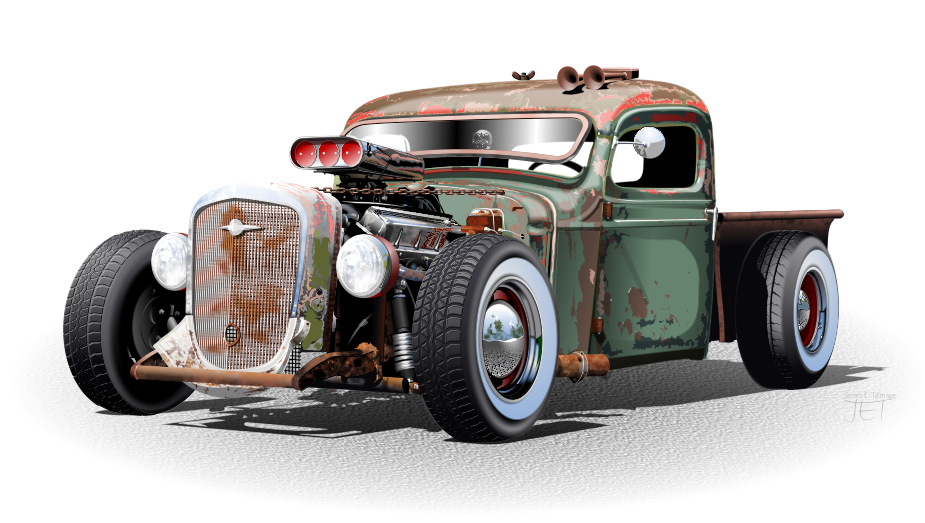
The example below was actually drawn in Xara Designer, not Illustrator, but the principles are the same. The subject was chosen specifically because I wanted to test the software using a subject that is not the usual idealized body polished for the tradeshow stage. Surfaces range from dull (rooftop) to matte (whitewalls) to glass (headlamps) to rust (exhaust) to chrome (hubcaps).
Despite the multiple surfaces and suggested detail, you can see from the outline view an economy of paths, "drawing what I see" while exploiting the specific advantages of the program (medium) and avoiding its weaknesses.

So just pick the desired car subject and start drawing. When you get to a specific situation that gives you trouble, post a screenshot of it and ask for suggestions for treatment.
JET


 AdChoices