


How to get a straight (vertical) end on a curved path
Hi everyone,
This is one of those things that drives me crazy because it feels so simple, but I can’t figure out the solution.
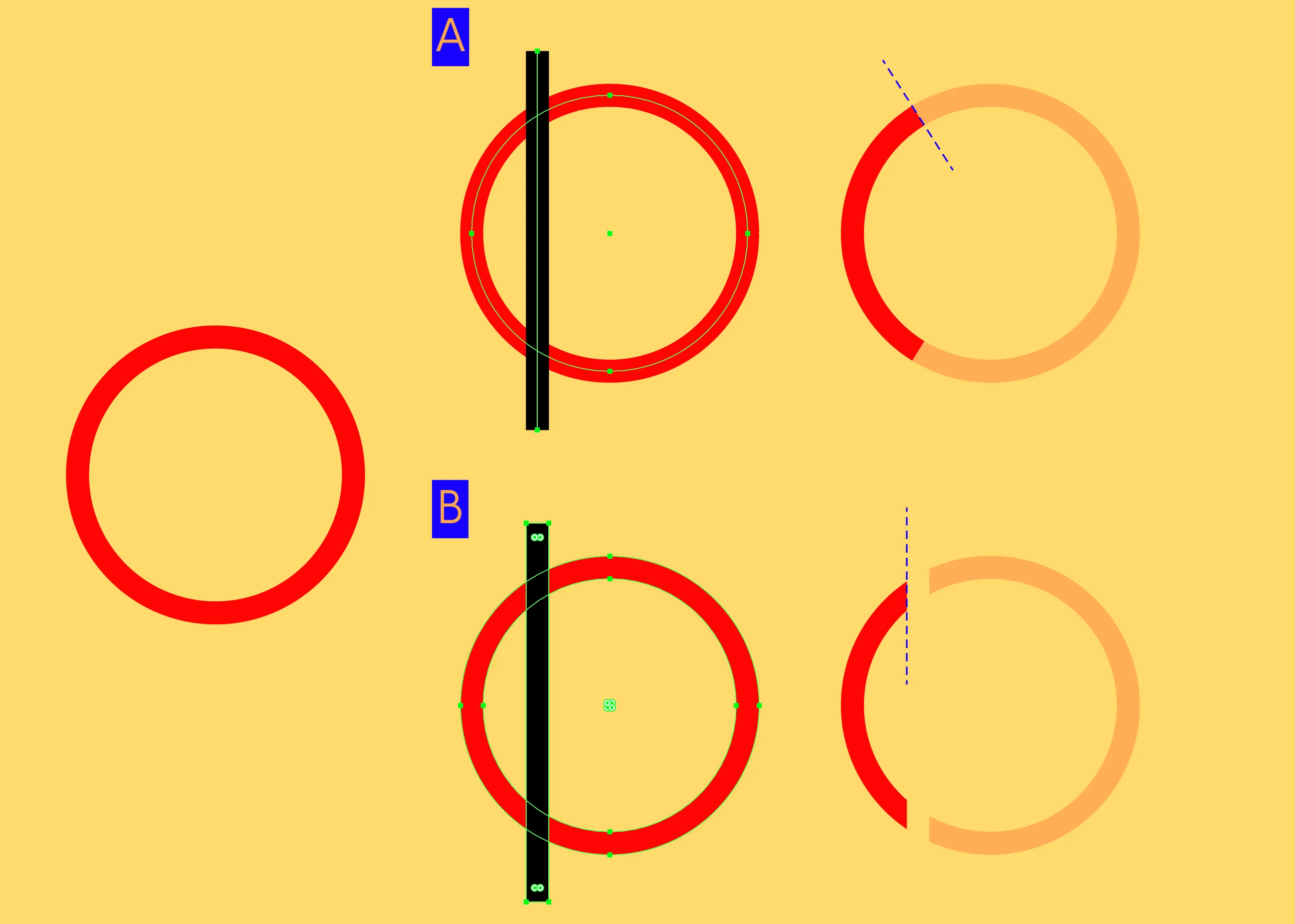
I have a circular path that I want to turn into an arc (I’m referring to a section of the perimeter), but I like the ends of the path to be cut perfectly straight at 90°.
I’ve attached an image for reference:
In Figure A, you can see what happens when I use the Scissors Tool to create the cutting points on my circle and then delete the segment. The path ends keep the natural tangent angle of the circle.
In Figure B, you can see that one way to solve this is by expanding the stroke and intersecting it with a rectangle with straight sides. In this case, the ends are cut vertically, which is exactly what I’m looking for.
My challenge is to achieve the result from B while keeping it as a path, without needing to expand the stroke into a filled shape.
Any ideas on how to do this?
Thanks a lot for your help!

 AdChoices